Web hosting is a service which houses all the files that make up a website. It’s a service that essentially the entire online industry is built on and was valued globally at an impressive $149.30 billion in 2025.
When you pay for web hosting, you’re paying a provider to store, secure, and deliver your website’s data like text, images, code, or videos to visitors whenever they type in your domain name.
In this guide, we’ll explain how web hosting works, the different web hosting types available, how much it costs, and how to choose the right option for your needs. By the end, you’ll be confident about your knowledge of web hosting and the type that’s right for your project.
What is Web Hosting Exactly?
We’ve established that web hosting is a service that stores your website’s files on a server and makes them accessible on the internet. When someone types your domain name into a browser, their device connects to that server, which then delivers your website’s content so it can load on their screen.
Without hosting, your website simply wouldn’t be visible. It would exist only on your computer. A hosting provider supplies the physical servers, network connection, security systems, and technical maintenance needed to keep your site running reliably 24/7. It’s basically a space where your website lives.
Modern hosting services are a full package experience. They include features such as SSL certificates needed for site security, automatic backups so you don’t lose your website data to unexpected glitches or bad updates, performance optimization so that your site loads fast, and technical support for all your questions. What web hosting does not provide by default is a domain name and a website template or builder. While many providers offer these services bundled together for convenience, it’s important not to mix them up and assume that a hosting provider will automatically give you tools to create a website or even build one for you.
How Does Web Hosting Work?
Web hosting works by storing your website’s files on a server that is always connected to the internet. When someone types your domain name into their browser, a series of actions happen in seconds to display your website.
Here is a breakdown of how web hosting functions behind the scenes:
- The domain name is translated into an IP address through the Domain Name System (DNS).
- This tells the browser which server your website is hosted on.
- The browser then sends a request to that server.
- The server processes the request and sends back the necessary files like HTML, CSS, images, scripts, and databases.
- The browser assembles those files and displays the page to the visitor.
Your website files are stored on physical servers inside secure data centers owned by hosting providers. These facilities are built for reliability, speed, and uptime - their main goal is that your site is accessible 24/7.
A typical web hosting service includes:
- Server storage space: The amount of disk space allocated on a server to store your website’s files, images, databases, and emails.
- Bandwidth (data transfer): The volume of data your website can transfer to visitors over a given period, affects how much traffic your site can handle.
- DNS management: The system that connects your domain name to your hosting server by directing traffic to the correct IP address.
- Control panel access: A web-based dashboard that allows you to manage your hosting account, files, domains, email, and settings without technical coding.
- Database support: The ability to create and manage databases (such as MySQL) that store dynamic website content like user accounts or product listings.
- SSL certificate support: A feature that enables encrypted connections (HTTPS) in that way protecting data exchanged between your website and visitors.
- Security features (firewalls, malware scanning): Protective tools that block unauthorized access, detect threats, and prevent malicious activity on your website.
- Automatic backups: Scheduled copies of your website data that allow you to restore your site if something goes wrong.
- Email hosting: The ability to create and manage professional email accounts linked to your domain (e.g., info@yourdomain.co.za).
- Technical support: Access to hosting experts who assist with troubleshooting, setup, and server-related issues.
- Uptime monitoring: Continuous tracking of server availability to ensure your website remains online and accessible.
Types of Web Hosting Explained
Not all websites have the same needs. A personal blog doesn’t require the same resources as a high-traffic eCommerce store. That’s why hosting providers offer different types of hosting, each designed for specific levels of traffic, performance, and control.
Let’s explore the most common web hosting types and their use cases.
Shared hosting
What it is: Shared web hosting means multiple websites share the same server and its resources, including CPU power, memory, and storage.
Who it’s best for: Beginners, bloggers, small business websites, and anyone launching a low-traffic site.
Pros:
- Affordable and beginner-friendly
- Easy setup
- Minimal technical knowledge required
Cons:
- Limited performance during traffic spikes
- Less control over server settings
- Other sites on the server can affect performance
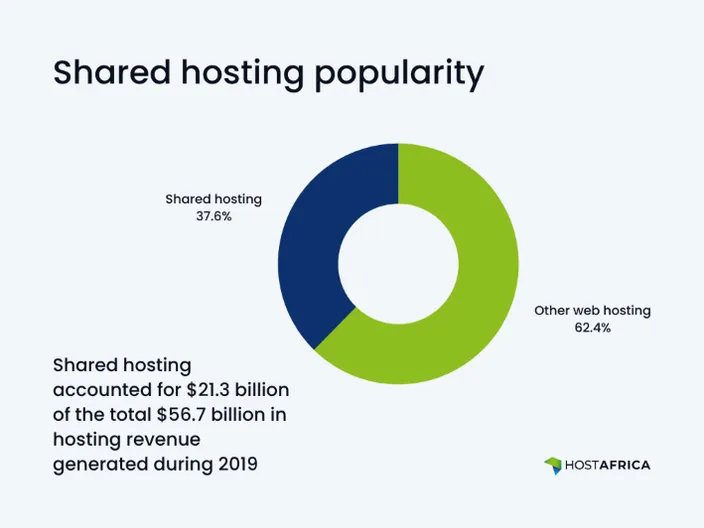
Shared hosting is the most cost-effective way to get online and by far the most popular one because its limitations are not something small-to-medium sites need to worry about.
VPS hosting (virtual private server)
What it is: VPS hosting still shares a physical server, but you don’t share those server resources. The resources are partitioned into dedicated virtual environments, which means your website gets its own allocated CPU, RAM, and storage.
Performance and control benefits:
- More stable performance
- Greater customization
- Better handling of traffic spikes
- Root access (in many cases)
VPS hosting is ideal for growing websites that need more reliability and resources without the cost of a dedicated server. If you’re not sure whether shared hosting is enough or you need VPS hosting, dig deeper with our shared vs VPS hosting guide.
Dedicated hosting
What it is: Dedicated hosting gives you an entire physical server exclusively for your website.
Who actually needs it: Large businesses, high-traffic platforms, enterprise applications, or websites with strict security and compliance requirements.
It offers maximum performance, control, and security, but comes at a significantly higher cost and often requires technical expertise. Before you commit, read our dedicated hosting guide to make an informed and confident decision.
Cloud hosting
What it is: Cloud hosting uses multiple interconnected servers instead of a single physical machine and distributes resources across a network.
Why it’s popular for growing websites:
- Easily scalable during traffic spikes
- High uptime reliability
- Pay-for-what-you-use flexibility
If one server fails, another takes over, reducing downtime risk.
WordPress hosting
What it is: WordPress hosting is specifically configured to run WordPress websites efficiently, with performance and security optimizations built in.
Managed vs unmanaged:
- Managed WordPress hosting: The provider handles updates, security, backups, and performance optimization.
- Unmanaged WordPress hosting: You manage technical maintenance yourself but have more control.
This option is ideal if you’re running a WordPress site and want performance tuned for that platform. It addresses known WordPress vulnerabilities, like outdated plugin security.
How Much Does Web Hosting Cost?
Web hosting costs vary depending on the type of hosting, performance level, and included features. Entry-level plans are inexpensive, but more advanced setups increase in price as you gain speed, control, and scalability.
Typical web hosting price ranges
- Shared hosting: This is the most affordable option and ideal for blogs, portfolios, and small business sites. Prices generally range from R60 to R300 per month for basic plans.
- VPS hosting: VPS plans offer dedicated server resources within a shared physical server and are suited to growing websites. Typical VPS pricing ranges from about R120 to R2,500+ per month, depending on resource levels like CPU, RAM, and storage.
- Cloud or managed hosting: Cloud hosting provides scalable resources across multiple servers. Entry-level cloud plans often start around R200–R400 per month, while fully managed cloud environments and higher-tier setups can cost R1,000+.
- Dedicated servers and enterprise hosting for large-scale, high-traffic websites or complex applications, dedicated hosting can range from R1,500 up to R6,000+ per month and even higher for premium setups.
Why hosting prices differ between providers
Hosting prices vary due to factors such as:
- Server performance and hardware quality
- Data center locations
- Security features included
- Level of customer support
- Backup frequency and automation
- Brand positioning and reputation
Very cheap hosting will limit even the essentials like resources or backup frequency, while premium providers often include extras like performance optimization and 24/7 human customer support.
Initial pricing vs renewal pricing
With web hosting prices, always keep an eye out for dishonest practices because understanding long term costs is critical. Some hosting companies advertise very low starting prices to attract new customers. These discounted rates often apply only to the first billing term. Upon renewal, prices can increase significantly, sometimes even 4 or 5 times.
Always check:
- The renewal rate
- The billing cycle length required for discounts
- Any add-ons automatically included
Is free web hosting possible?
Free web hosting sounds great, but it always comes with a catch. Some providers will offer you an opportunity to get your site live for free, but your website's performance and user experience will pay the price. Your site will be full of ads, load slowly, and uptime might not be a guarantee.
What’s worse, free web hosting offers often come with hidden tricks, such as massive renewal costs. If you decide to build an online presence, consider paid vs free web hosting very carefully because in 99% of the cases, you will be better off with an affordable paid web hosting solution.
What to Look for When Choosing a Web Hosting Provider
Choosing a hosting provider isn’t just about price. The wrong decision can lead to slow load times, downtime, security issues, and frustrated customers. The right one gives you stability, room to grow, and peace of mind.
This what you should always look for in a solid, reliable web hosting provider:
Uptime guarantee
Uptime refers to how reliably and consistently your website remains accessible. A reputable provider should offer at least a 99.9% uptime guarantee, backed by service-level commitments. Even small percentages matter because repeated downtime can damage trust, hurt conversions, and even get your website deindexed from Google search.
Example: If a host offers 99.9% uptime, your site could be down for roughly 40–45 minutes per month. Anything below that can start affecting sales and SEO performance.
Speed and performance
Website speed directly affects user experience and Google rankings. Strong hosting performance depends on modern hardware (SSD or NVMe storage), optimized servers, and data centers close to your audience. Many quality hosts also include caching systems or CDN integration to improve load times globally.
Example: If your audience is in South Africa, hosting in a local data center like HostAfrica can reduce latency compared to hosting overseas.
Security features
Security is not optional, it’s foundational. A good host should include SSL certificates, firewalls, malware scanning, and automated backups as standard features, not expensive add-ons. Proactive security reduces the risk of hacking, data breaches, and costly downtime.
Example: An SSL certificate ensures your site uses HTTPS, which protects visitor data and builds trust.
Customer support quality
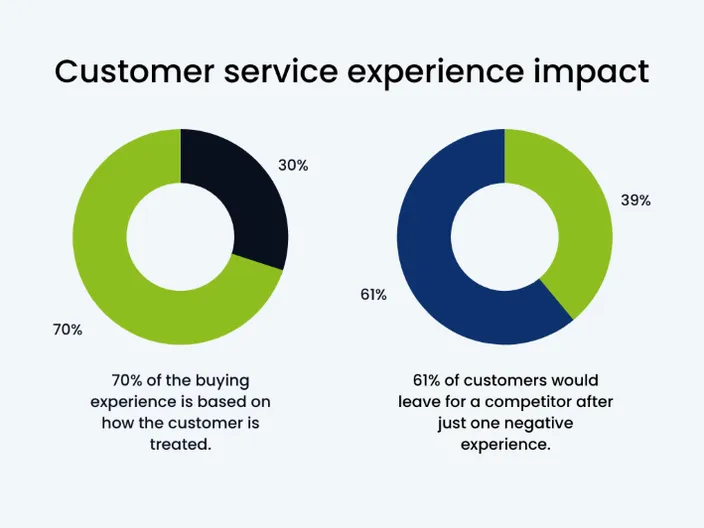
No matter how stable your hosting is, issues can happen. Reliable 24/7 support via live chat, phone, or ticketing ensures problems are resolved quickly. Sure, AI bots can answer basic questions, but fast, knowledgeable human support becomes critical during outages or technical misconfigurations.
Example: If your site goes offline during a promotion, waiting 24 hours for a support response will cost you a lot more than you would save by getting the cheapest possible hosting solution.
Ease of use (control panel)
A clear, intuitive control panel allows you to manage domains, emails, databases, and files without needing advanced technical skills. Most providers offer cPanel or custom dashboards designed for simplicity. The easier the interface, the faster you can deploy and maintain your website.
Example: Platforms like cPanel or custom dashboards allow one-click WordPress installs and email setup.
Scalability options
Your hosting should support growth without forcing a complete migration. As traffic increases, you should be able to upgrade from shared hosting to VPS or cloud hosting seamlessly. Scalability protects your website from performance bottlenecks during traffic spikes.
Example: If your traffic increases from 1,000 to 50,000 monthly visitors, you should be able to upgrade from shared hosting to VPS or cloud hosting without hassle. Don’t hesitate to ask support how they handle website growth before committing.
Popular Web Hosting Terms Explained
Trying to choose the right web hosting solution but baffled by all the terminology and features? Here is a list of most common terms used to discuss web hosting solutions. Once you understand what they mean, you can choose your web hosting plan with confidence:
- Server: A powerful computer that stores your website’s files and delivers them to visitors when requested.
- Bandwidth: The amount of data your website can transfer to users over a given period, affecting how much traffic it can handle.
- Storage: The disk space allocated to store your website’s files, databases, emails, and media content.
- Uptime: The percentage of time your website remains online and accessible to visitors.
- SSL (Secure Sockets Layer): Encryption technology that protects data transferred between your website and its visitors and enables HTTPS.
- Backups: Saved copies of your website that allow you to restore it if something goes wrong.
- Reseller hosting: A type of hosting that allows you to purchase server resources in bulk and resell them to clients under your own brand. It's one of the most common ways to start a web hosting business without owning physical servers.
- IP Address: A unique numerical address assigned to a server so devices can locate and communicate with it on the internet.
- Data Center: A secure facility that houses servers and infrastructure needed to keep websites running continuously.
- CDN (Content Delivery Network): A network of global servers that caches your website’s content to improve speed and reduce latency.
- cPanel: A widely used hosting control panel that allows users to manage files, domains, databases, and emails through a graphical interface.
- Nameservers: Servers that connect your domain name to your hosting provider by directing traffic to the correct server location.
- FTP (File Transfer Protocol): A method used to upload, download, and manage website files directly on a hosting server.
- Root Access: Full administrative control over a server, allowing advanced customization and configuration (common with VPS and dedicated hosting).
- Caching: A performance technique that stores temporary versions of website content to speed up loading times and reduce server strain.
Conclusion
Web hosting is the foundation of every website. It’s the service that stores your files, keeps your site online, protects your and your visitors’ data, and delivers your content to visitors around the clock. Without hosting, your website simply cannot exist on the internet.
The key is choosing the right type of hosting for your current needs, meaning not overpaying for resources you don’t use, but also not limiting your growth with a plan that’s too small. Shared hosting works for beginners. VPS and cloud hosting support growing traffic. Dedicated servers serve high-demand, high-risk platforms.
As you evaluate providers, focus on uptime, speed, security, support, and scalability, not just the lowest advertised price. Pay attention to renewal costs, included features, and how easy it is to upgrade later.
If you approach hosting as infrastructure rather than an afterthought, you’ll build your website on a stable, secure foundation. And that foundation directly impacts your performance, credibility, and long-term success online.
If this article helped you understand web hosting, these related guides can help you learn more about hosting options, setup, costs, domains, and choosing the right provider: