Choosing between local and international web hosting is simpler than it looks. It mostly comes down to where your audience is and how fast your website loads for them. Server location affects latency, which is the time it takes for data to travel between a visitor and your site, and any delay can directly impact user experience, SEO, and conversions.
In this guide, we will break down the difference between local and international hosting, explain how server location affects speed, and help you choose the right option based on your audience, performance needs, and long term plans.
Local vs International Web Hosting Explained
Local web hosting means your website is hosted on servers located in the same country or region as your target audience. For example, if your business serves customers in South Africa, local South African hosting would place your website on servers inside the country, typically in cities like Johannesburg or Cape Town. This keeps the physical distance between your users and your server short as so your site loads faster.
International web hosting, on the other hand, means your website is hosted on servers in another country, often in regions like the United States or Germany. These regions have giant data center infrastructure because they are digital hubs and it makes sense to put your website on these servers if you are targeting an international audience.
At a basic level, the difference comes down to distance. A visitor in Johannesburg accessing a website hosted in Johannesburg will get a much faster response than if that same website is hosted in Europe or North America. It is similar to ordering something from a shop across the street versus shipping it from another continent.
Local vs International Hosting: Key Differences
Here is a quick side by side comparison to highlight how local and international hosting differ in practice with local South African users in mind.
| Factor | Local hosting | International hosting |
| Speed and latency | Lower latency, faster load times for local users | Higher latency, slower response for local users |
| Support | Local time zone, faster support response | Time zone delays are common |
| Compliance | Easier to meet local data regulations | May involve cross border data concerns |
| Pricing | Local currency, predictable billing | Often priced in USD, exchange rate risk |
The biggest difference you will notice in real use is speed. Everything else, like SEO, conversions, even how responsive your site feels, builds on top of that.
How to Choose the Right Hosting Location for Your Website
Picking the right hosting comes down to understanding your audience, your website’s needs, and your growth plans.
To get on the right track, ask yourself these questions:
- Where are my users located? If most visitors are local, a local server will deliver faster load times and a better user experience.
- Do I need global global reach? Local hosting boosts speed for domestic users, while international hosting helps serve audiences worldwide.
- Do I need to comply with local regulations? Hosting locally makes it easy to follow rules like POPIA.
- What is my budget? Local providers like HostAfrica almost always bill in local currency, which means no exchange rate surprises and prices that correspond to the country's economical situation. International hosts usually bill in USD and universally cost more.
- Will my website grow quickly? Consider your plans for the next 2-3 years and whether the chosen hosting provider will be ready to support it. To be fair, both international and local hosting providers will usually be able to offer solid growth opportunities.
By answering these questions, you can match your hosting choice to your audience, performance needs, and business goals.
Now let’s look into both local and international options in more detail.
When to Choose Local Hosting
Local hosting makes the most sense when your audience is primarily in the same country or region as your server. If most of your visitors are in South Africa, hosting locally reduces latency, improves page load speed, and creates a smoother user experience.
Here are some situations where local hosting is the best choice:
- Targeting a local audience: Customers in the same country will experience faster load times.
- Need for compliance: Local hosting simplifies meeting data protection regulations like POPIA.
- Faster support: Local providers operate in your timezone, making it easier to get help quickly.
- Predictable costs: Billing in local currency avoids exchange rate fluctuations common with international hosting.
For example, an online store in Cape Town serving South African customers will see quicker checkouts, faster page loads, and fewer abandoned carts when using local hosting.
Local hosting gives you a reliable foundation, especially for businesses that rely on speed, compliance, and user trust.
When to Choose International Hosting
International hosting is a better fit when your audience is spread across multiple countries. On occasion, giant global hosts will also be able to offer advanced features smaller local providers might not have.
Consider international hosting in these scenarios:
- Global audience: If most of your visitors are outside your country, hosting closer to them improves their experience.
- High traffic and scalability: Large platforms, SaaS products, or websites expecting rapid growth benefit from international providers with global infrastructure.
- Advanced features: Some international hosts offer state-of-the-art technology they themselves created, complex managed services, and integrations that local hosts may lack.
- Redundancy and uptime: Multiple global data centres means higher reliability and disaster recovery options.
For example, a consulting firm with clients in Europe, the US, and Asia might want to choose a primarily international host with servers in multiple regions to keep performance consistent for all users.
Why Server Location Matters For Website Speed
Server location has a direct impact on how fast your website loads because every request has to travel between the user and the server. The further that distance, the longer it takes to send and receive data.
When someone visits your site, their browser sends a request to your server, and your server sends back the page content. If your server is in Johannesburg and your visitor is also nearby, that round trip happens very quickly. If your server is in United States, the same request has to travel thousands of kilometres across undersea cables and multiple network points before it gets a response.
That extra distance adds delay, even if your hosting provider uses high quality infrastructure. This delay is called latency, and it plays a big role in how responsive your website feels.
In real terms, a locally hosted website might respond in 20 to 40 milliseconds, while the same site hosted overseas could take 150 to 300 milliseconds just to start loading. That difference might sound small, but it adds up quickly as your page loads multiple files like images, scripts, and stylesheets.
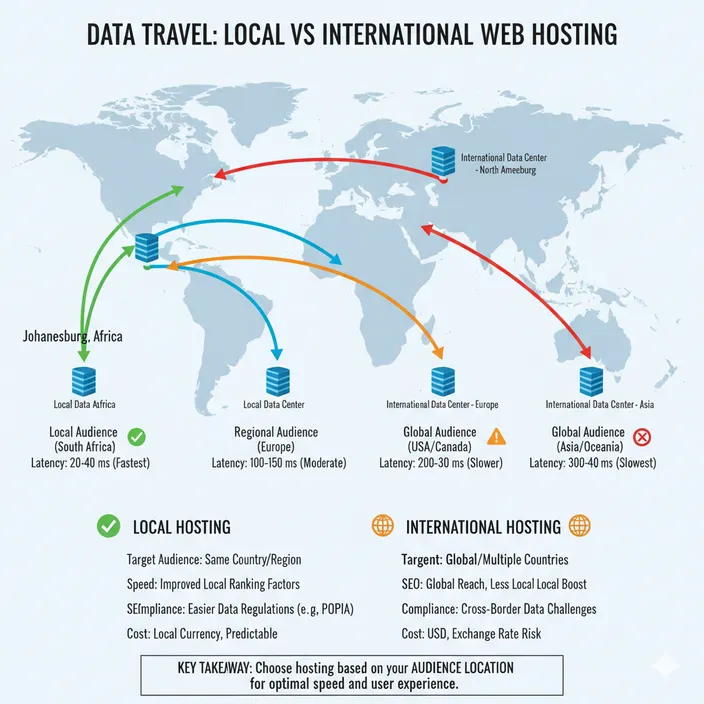
This is why server location affects more than just speed tests. It influences:
- how quickly your page starts loading
- how smooth your website feels when users interact with it
- how likely visitors are to stay or leave
For example, an eCommerce store targeting customers in South Africa will feel noticeably faster when hosted locally. Pages load quicker, checkout flows respond faster, and users are less likely to drop off due to delays.
Search engines also take this into account indirectly. Faster websites tend to have better engagement, lower bounce rates, and stronger Core Web Vitals, all of which contribute to better rankings over time.
In short, the closer your server is to your users, the faster your website will feel.
Now let’s look a bit more closely at the core reason behind this discussion - latency.
How Latency Works And Why Distance Slows Down Your Website
Latency is the time it takes for data to travel between a user’s device and your server, and it is one of the main reasons website speed changes depending on where your hosting is located. Even if your server is top of the line, physical distance introduces delays that no amount of optimization can fully eliminate.
What happens when someone visits your website
To understand why distance matters, let’s look at what happens in the background when a visitor opens your site:
- DNS lookup: Your browser finds the server address for your website.
- TCP handshake: A connection is established between the browser and server.
- Request sent: The browser asks the server for your website files.
- Server response: The server processes the request and sends back data, including the HTML, CSS, JavaScript, and images.
Each of these steps takes time, and the longer the distance, the longer it takes for data to travel back and forth.
Why physical distance matters
Data travels along fiber optic cables, undersea cables, and network hops. Every additional hop or kilometre adds a small delay, and these delays add up. For example:
- A website hosted in Johannesburg may respond in 20 to 40 milliseconds for local users.
- A website hosted in Europe might take 150 milliseconds for the same visitor.
- Hosting in the United States could reach 200 to 300 milliseconds.
Even small delays can affect the time to first byte (TTFB), which is a crucial Core Web Vitals metric, and overall page load speed.
Real world impact
Imagine visiting an online store. A locally hosted site starts loading instantly, images appear quickly, and the checkout process feels smooth. The same store hosted overseas might feel sluggish, even if the site is optimized perfectly. Users are more likely to abandon slow pages, which can hurt sales, engagement, and SEO performance.
In short, server proximity reduces latency, improves responsiveness, and gives your website a clear performance advantage for your target audience.
Does Hosting Location Affect SEO
Many people wonder if choosing local or international hosting directly affects search engine rankings. The short answer is not directly, but the effects on speed, user experience, and engagement make a big difference for SEO.
Search engines like Google consider page load speed and Core Web Vitals when ranking websites. A website hosted closer to your audience loads faster, which improves bounce rates, session duration, and interaction metrics. These factors signal to search engines that your site provides a good user experience, which can indirectly boost rankings.
International hosting is still fine if your audience is global, but for websites focused on a specific country, local hosting gives a measurable advantage for SEO metrics and direct user experience.
In short, hosting location does not guarantee higher rankings, but it can boost performance and engagement metrics that search engines reward.
Local vs International Hosting: Final Verdict
When it comes down to it, your audience determines the best hosting choice. If most of your visitors are local, a South African server will deliver faster page loads, smoother interactions, and indirectly - better Google rankings. Local hosting also makes compliance, support, and billing simpler and more predictable.
International hosting makes sense if your audience is global or your website requires advanced infrastructure and scalability.
In short, choose hosting based on who your users are, how your website performs, and your growth plans. The right server location can improve speed, engagement, SEO, and ultimately your bottom line.
If you’re comparing local and international hosting, these related resources can help you understand speed, compliance, support, email hosting, and how to choose the right provider:
- Why Hosting Locally in Africa Beats Global Hosts for Speed & Compliance
- Local vs Global Email Hosting: What South African Businesses Need to Know
- Your Hosting, Your Language: Why Local Support Makes All the Difference
- Why You Should Be Considering Using a Web Hosting Provider
- How To Choose the Best Web Hosting for Your Online Business
- How to Host Your Own Website
- How Much Is It To Host A Website In South Africa?