This takes under a minute. Your star rating and written review stay exactly as they are; you only answer the question "How likely are you to recommend HostAfrica to a friend or colleague?"
Step 1: Sign in to Hellopeter
Go to hellopeter.com/sign-in and sign in with the email address or mobile number you used when you wrote your review. If your one-time PIN does not arrive, try entering your mobile number without the leading "0".

Step 2: Open My Profile & Reviews
Click the menu button at the top right of the page, then choose My Profile & Reviews.

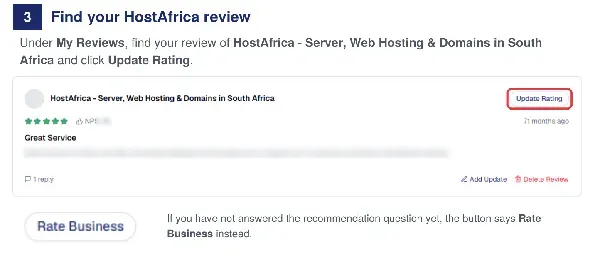
Step 3: Find your HostAfrica review
Under My Reviews, find your review of HostAfrica - Server, Web Hosting & Domains in South Africa and click Update Rating. If you have not answered the recommendation question yet, the button says Rate Business instead.
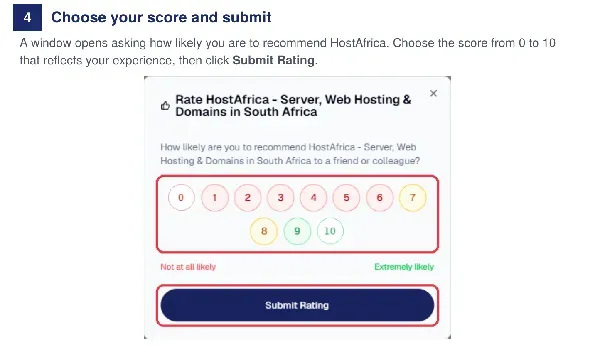
Step 4: Choose your score and submit
A window opens asking how likely you are to recommend HostAfrica. Choose the score from 0 to 10 that reflects your experience, then click Submit Rating.
Need help? For trouble signing in to Hellopeter, email admin@hellopeter.com. For anything about your HostAfrica service, contact our support team and they will assist.