Your app works on your laptop. Your client wants a link by Friday. And "just host it somewhere" turns out to mean at least six different things, most of them with a pricing page in dollars.
Web app hosting is simpler than it looks once you know what your app actually needs. This guide explains what web app hosting is, how it differs from ordinary web hosting, and which type fits what you've built, whether that's a React frontend, a Laravel app with a database, or a Node.js API that has to stay on. We'll finish with a framework-by-framework guide, so you can go straight to the setup that matches your stack.
Key Takeaways: Web App Hosting
- A website and a web app need different hosting. Static sites only serve files; web apps run server-side code and usually a database.
- There are four main types of web app hosting: static hosts, shared hosting, a VPS, and a managed app platform.
- Most full stack apps are easiest on a managed platform. You push your code, and the platform builds, deploys, and runs it.
- Location affects load times. Hosting close to your users shortens every request.
- HCode hosts web apps in South Africa from R50 a month, with a managed PostgreSQL or Redis database included.
What Is Web App Hosting?
Web app hosting is hosting that runs your application's server-side code and database, not just its files. Ordinary web hosting stores pages and sends them to visitors. Web app hosting also has to keep your code running, answer requests as they come in, and talk to a database in the background.
In practice, good web app hosting gives you:
- A runtime for your language, such as Node.js, Python, or PHP
- A way to deploy new versions of your code without breaking the live one
- A database, or a safe way to connect to one
- Secure web addresses (HTTPS) and custom domains
- Logs, so you can see what went wrong when something does
The more of that list the host handles for you, the less time you spend running servers and the more time you spend building.
Website vs Web App: Why the Difference Matters
The type of hosting you need depends on whether you've built a static site or a dynamic web app.
A static website is a set of finished files: HTML, CSS, images, and some JavaScript. Every visitor gets the same pages, built ahead of time. A dynamic web app does work on the server side every time someone uses it. It logs people in, saves form entries, processes payments, and reads from a database.
Think of it as the difference between a printed menu and a kitchen. A static site is the printed menu: make it once, hand out copies. A web app is the kitchen, cooking each order as it arrives. The kitchen needs staff, gas, and a fridge. Your web app needs a running server, a runtime, and a database.
One honest note: if your project is purely static, with no server code and no database, a static host can serve it cheaply. Web app hosting earns its keep once your app has a backend, stores data, or you'd rather keep everything on one bill.
The Main Types of Web App Hosting
There are four main ways to host a web app, and they differ mostly in how much you manage yourself.
Static hosts serve pre-built files through content delivery networks. They're fast and cheap for static sites, but most can't run a full stack web app on their own; you add separate web services for the backend and database.
Shared hosting puts many websites on one server. It's affordable and works well for websites and simple PHP apps, but it usually can't run a Node.js or Python app that needs to stay running.
A VPS (virtual private server) gives you your own slice of a server with full root access. You can run any application you like, but you install, secure, update, and back up everything yourself.
A managed app platform (often called PaaS, or platform as a service) runs your code for you. You connect your repository, and the platform builds the app, runs it, and handles HTTPS, deploys, and usually the database. It's the closest thing to "push and forget" for developers who build full stack applications.
| Type | Best for | What you manage | Database | How you pay |
|---|---|---|---|---|
| Static host | Static sites and pre-built frontends | Very little | Separate service | Often free to start, then usage |
| Shared hosting | Websites and simple PHP apps | Your site files | Usually MySQL included | Flat monthly |
| VPS | Custom stacks, several apps, root access | Everything: OS, security, updates, backups | You install it | Flat monthly, by resources |
| Managed app platform | Full stack apps, APIs, and workers | Your code and settings | Usually included or one click away | Flat monthly or usage-based, depending on the provider |
Want to see how managed platforms compare head to head? Our guide to Vercel alternatives covers the options for South African developers.
Which Hosting Fits What You Built?
Match the hosting to the app, not to the most popular platform on social media. Start with what you've built, then ask how much of the running you want to do yourself.
| What you've built | Good fit | Why |
|---|---|---|
| A portfolio, landing page, or brochure site | Static host or shared hosting | No server code to run |
| A React, Vue, or Astro frontend that calls an API | Managed app platform | Frontend and API hosted side by side, one bill |
| A Laravel, Django, or Next.js app with a database | Managed app platform | Server-side code, a database, and deploys handled for you |
| A Node.js API, bot, or queue worker that must stay on | Managed app platform or VPS | Needs an always-on process, not a sleeping one |
| Several apps, custom software, or root access | VPS | Full control over the server |
If you're unsure, ask yourself one question: "Do I want to manage a server?" If the answer is no, a managed app platform is almost always the right call.
How Web Application Deployment Works Today
Deploying a web app means moving it from your computer to a server where people can use it, and most modern hosting makes that a single step.
- A simple git push. On a managed platform, you connect your GitHub repository once. After that, every push automatically builds and deploys a new version. If the build fails, the live version keeps running.
- The command line. On a VPS, you build and deploy applications yourself over SSH: install the runtime, pull your code, start the app, and put a web server in front of it.
- Your AI assistant. Tools like Claude and ChatGPT can now deploy for you. Connect them to your host and ask in plain language: "Deploy this app and add a database."
The git push route is the fastest way to go live. The command line route gives you the most control. If that's what you're after, our step-by-step guide on how to deploy an app from GitHub to a VPS walks you through it.
Load Times and Location: Why Where You Host Matters
The closer your server is to your users, the faster your web app responds.
Content delivery networks (CDNs) help with the static parts of your site. They keep copies of images, styles, and scripts in data centres around the world, so those files load quickly almost anywhere. But a CDN can't cache everything. Every login, search, checkout, and database query still travels to wherever your app actually runs, and back again.
For a web app with South African users, that trip matters. If the app runs overseas, each request crosses an ocean before the user sees a result. If the app and its database run in South Africa, the trip is short, and so is the wait.
Location affects more than load times, too. Keeping your app, its data, and its backups in South Africa can make POPIA conversations simpler, though hosting is only one part of compliance.
Web App Hosting by Framework
Every framework needs something slightly different to run in production. Find yours below, then follow the link for setup details.
| Framework | What it usually is | What it needs to run | Learn more |
|---|---|---|---|
| Next.js | Full stack React framework | A Node.js server for server rendering, or static output | Next.js hosting |
| React | Frontend library | A static bundle, or a Node.js server if it renders on the server; usually an API beside it | React hosting |
| Vue.js | Frontend framework | A static bundle, plus an API for anything dynamic | Vue.js hosting |
| Nuxt | Full stack Vue framework | A Node.js server, or static output | Nuxt hosting |
| Astro | Content-focused sites | Mostly static output, with optional server rendering | Astro hosting |
| Express | Node.js backend framework | An always-on Node.js process | Express hosting |
| Node.js | Runtime for APIs, bots, and workers | An always-on Node.js process | Node.js hosting |
| Laravel | Full stack PHP framework | A PHP runtime, a database, and often a queue worker | Laravel hosting |
| Django | Full stack Python framework | A Python runtime and a database | Django hosting |
| Python | Flask, FastAPI, and other Python web apps | A Python runtime, often with a database | Python hosting |
| PostgreSQL | The database behind most of the above | Managed storage, backups, and a private connection to your app | PostgreSQL hosting |
A pattern worth noticing: frontend frameworks (React, Vue, Astro) rarely work alone. They talk to an API, and the API talks to a database. The simplest setup keeps all three on one platform.
HCode: Web App Hosting in South Africa
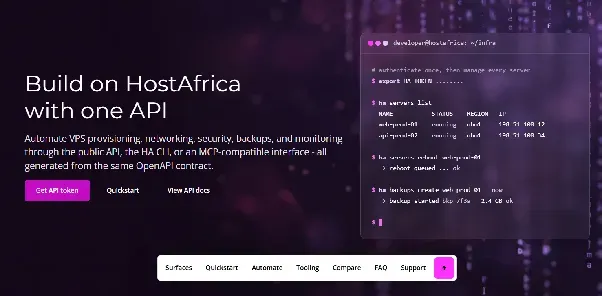
HCode is HostAfrica's managed app platform: you bring the code, and we run the servers.
Push or upload
Connect a GitHub repository and every push deploys again, or upload a .zip if you'd rather skip Git. HCode detects your framework, installs dependencies, builds the app, and serves it over HTTPS.
A database included
Every plan comes with managed PostgreSQL or Redis on a private network beside your app, backed up daily.
Always on
Run web apps and background workers that stay running, with no sleeping and no wake-up delay.
Safe releases
A release that fails its checks never replaces the live one, and the last good version is a click away.
Deploy from AI
Ask Claude, ChatGPT, or Claude Code to deploy, add a database, or read your logs.
Local, in rand
Your app, database, and backups run in South Africa, on a flat monthly price in rand, with support from a South African team.
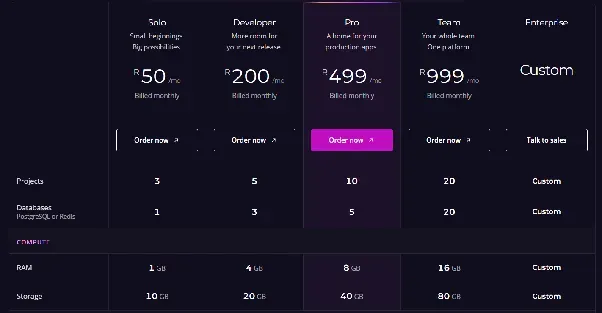
| Plan | Price | RAM | Projects | Databases |
|---|---|---|---|---|
| Solo | R50 a month | 1 GB | 3 | 1 |
| Developer | R200 a month | 4 GB | 5 | 3 |
| Pro | R499 a month | 8 GB | 10 | 5 |
| Team | R999 a month | 16 GB | 20 | 20 |
Prices include VAT. Pay annually to save up to 8%.
When a VPS Is the Better Choice
A VPS makes sense when you need control that a managed platform doesn't give you: root access, custom system packages, several apps sharing one server, or software that isn't a web app at all. A HostAfrica Linux VPS gives you all of that.
The trade-off is time. You handle the updates, firewall, security, backups, and monitoring. It's a bit like owning a house rather than renting: more freedom, and nobody else fixes the geyser. If that suits you, start with our guide to deploying an app from GitHub to a VPS.
FAQs: Web App Hosting Explained
What is web app hosting?
Web app hosting runs your application's server-side code and database so people can use it online. Unlike basic web hosting, it keeps your app running and answers each request as it arrives.
What's the difference between web hosting and web app hosting?
Web hosting stores and serves website files. Web app hosting also runs code on the server, connects to a database, and handles deploys, which dynamic apps like Laravel, Django, and Next.js need.
Can I host a web app for free?
Some providers offer free tiers, but they usually come with limits, such as apps that sleep when idle or databases that expire. HCode has no free tier, but code HCODEFREE2026 gives you your first month free.
Do I need a VPS to host a web app?
No. A managed app platform runs your app without you managing a server. Choose a VPS only if you need root access or custom software.
Where can I host a Python web app?
Any host with a Python runtime will do. On HCode, push your Django, Flask, or FastAPI app and it's detected, built, and run for you, with PostgreSQL included.
Where should I host a web app in South Africa?
Pick a host with servers in South Africa, so requests and database queries stay local. HCode runs your app and its database in South Africa, billed in rand.