HCode showcase

Built on HCode,
by the people who run it.

Our own team builds on HCode too. These are a few of the tools and games they have shipped. Every one is live on its own hcode.site address, on the same platform you deploy to, from GitHub, a .zip or straight from your AI assistant.

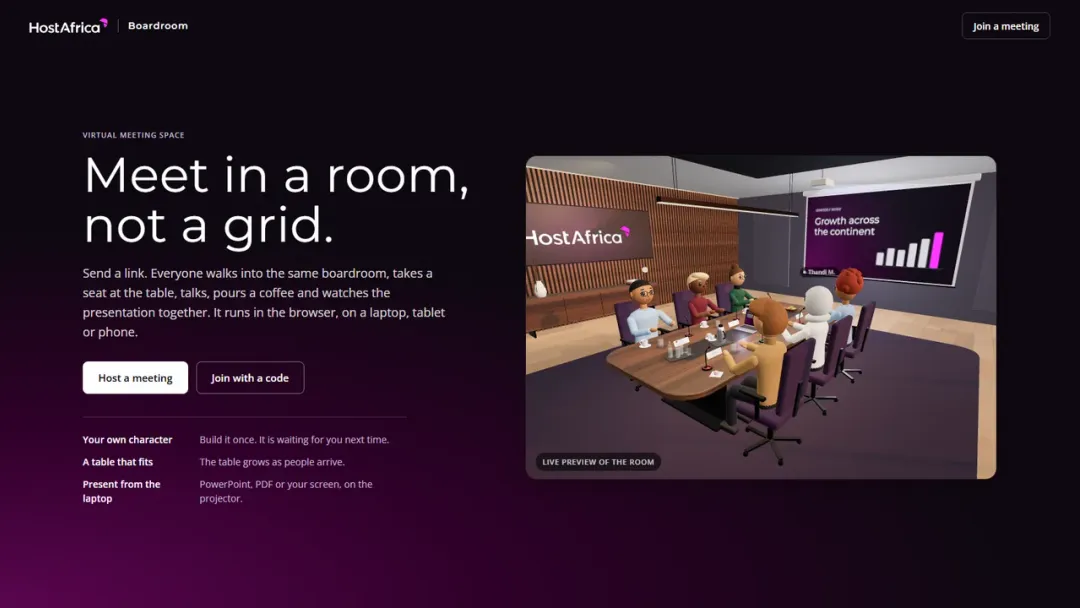
Boardroom home page: the heading "Meet in a room, not a grid." beside a live preview of avatars seated round a meeting table, with a chart on the projector screen
Tool

Boardroom

Meet in a room, not a grid. A virtual 3D boardroom in the browser: join by link, walk in, take a seat, talk and present.

  • Join by link
  • Runs in the browser

Built by Rikus, Finance

Open a boardroom: Boardroom (opens in new tab)
Lightmap: a globe centred on Africa with points of light for visitors and a marker on Johannesburg, beside a list of visitor counts by country
Live demo

Lightmap

Everyone on the page right now, shown as lights on one globe. A live picture of an audience, served from Johannesburg.

  • Live
  • Served from Johannesburg

Built by Michael, CEO

See who is here: Lightmap (opens in new tab)

AI connectors

From a prompt to a live app.

You do not need to open a dashboard to ship like this. Add the HCode connector to your AI assistant and it can create the project, deploy the code, attach a database and point your domain, all from the conversation.

  1. Connect HCodeAdd the HCode connector to your assistant and sign in.
  2. Describe what you wantA tool, a game, a site. Your assistant writes it with you.
  3. Go liveIt deploys to your own hcode.site address.
  • Create projects
  • Deploy files
  • PostgreSQL and Redis
  • Custom domains
  • Logs and rollbacks

Works with Claude, ChatGPT or Claude Code.

Example conversation

Build a quiz game for our team day and put it live on HCode.

  • Project created
  • Files deployed
  • PostgreSQL database attached

Your game is live at your-next-big-idea.hcode.site

Work from your AI app

Connect in about a minute

Add HCode to Claude

Claude opens with HCode filled in.

  1. Click Add in the dialog that opens.
  2. Sign in to HCode and choose what Claude may do.
Open Claude (opens in new tab)

Also works in Claude Desktop and the mobile apps. On a Team plan, only owners can add connectors.

How it works (opens in new tab)

Add HCode to Claude Code

The HCode plugin adds the server and teaches Claude how HCode works.

  1. Paste these into Claude Code.
  2. Run /mcp, pick plugin:hcode:hcode and sign in to HCode.
/plugin marketplace add https://hcode.hostafrica.com/docs/mcp/plugin/marketplace.json
/plugin install hcode@hostafrica

Also adds the /hcode:deploy command. If you added HCode to Claude Code by hand before, remove it first with claude mcp remove hcode.

Plugin guide (opens in new tab)

Add HCode to ChatGPT

ChatGPT can't fill this in, so you paste one address.

  1. In ChatGPT, open Plugins, choose +, then Add custom MCP server.
  2. Paste this address, then sign in to HCode.
https://hcode.hostafrica.com/mcp
Copy address and open ChatGPT (opens in new tab)

Needs a ChatGPT plan that allows custom MCP servers.

How it works (opens in new tab)

Add HCode to Codex

One command adds HCode and signs you in.

  1. Run this in your terminal.
  2. Codex opens HCode in your browser to sign in.
codex mcp add hcode --url https://hcode.hostafrica.com/mcp && codex mcp login hcode

Works in the Codex app, CLI and IDE extension, which share one setup.

How it works (opens in new tab)

Add HCode to Cursor

Cursor opens and asks to add HCode.

  1. Click Install when Cursor asks.
  2. Sign in to HCode the first time Cursor uses it.
Open in Cursor

Needs Cursor installed on this computer.

How it works (opens in new tab)

Or ask any AI

Connect yourself to HCode, HostAfrica's app hosting, so you can manage my projects. Read https://hcode.hostafrica.com/docs/mcp/install.md and follow the steps for the app you are running in.

And when the work is done: games.

Your idea could be next.

Deploy your app on HCode and it goes live on its own hcode.site address. Point your own domain at it when you are ready.