From Python Project to Production
Your Python app runs perfectly on your laptop, and the code is already sitting in GitHub. What's missing is a place to run continuously and be reachable by anyone who visits your domain.
The path from a local project to a live application follows a predictable route:
- Clone the GitHub repository onto a VPS.
- Create a virtual environment.
- Install the dependencies.
- Configure environment variables.
- Run the app with Gunicorn or Uvicorn.
- Keep it alive with systemd.
- Put Nginx in front of it as a reverse proxy once the domain and HTTPS are in place.
This guide walks through that path for deploying a Python app from GitHub to a VPS, covering the workflow that applies whether you're running Flask, Django, or FastAPI.
If you'd rather see the same process explained for any language, our general guide on deploying an app from GitHub to a VPS covers the shared groundwork.

The full path from GitHub to a live, publicly reachable Python application.
What You'll Need
- A working Python project pushed to GitHub
- A HostAfrica Linux VPS
- SSH access to that server
- Git installed locally and on the server
- A requirements.txt file (or equivalent dependency list)
- A domain name, if the app needs to be publicly reachable
Deploy the Python App Step by Step
Connect to and Prepare the VPS
Start by connecting to your server over SSH:
ssh your_user@your_server_ipOnce you're in, check that Git and Python are available:
git --version
python3 --version
Most modern Linux distributions ship with both, but if either is missing, install them through your distribution's package manager (for example, apt install git python3 on Ubuntu or Debian).
You'll also want Python's built-in virtual environment support, which usually comes with a separate package:
apt install python3-venvThere's no need to touch anything else on the server yet. This step confirms the tools you'll rely on for the rest of the deployment are actually there.
Clone the Python App from GitHub
With the basics confirmed, pull your code onto the server:
git clone <repository-url>
cd <project-directory>
repository-url is your GitHub repository's URL, and project-directory is the folder Git creates for it. From this point on, that folder is your application's source on the server, the same thing git pull will update later when you ship changes.
If the repository is private, you'll need to authenticate. An SSH key added to your GitHub account, or a personal access token used with HTTPS, both work well. Either way, keep credentials out of your command history and never paste a password or token directly into a clone command.
Create a Virtual Environment and Install Dependencies
The commands below create the environment, activate it, and run pip install against your requirements file.
python3 -m venv venv
source venv/bin/activate
pip install -r requirements.txt
A virtual environment is an isolated Python installation that belongs to your project. It matters more on a VPS than it might on your laptop, because a single server can easily end up hosting several applications. Each one may need a different set of packages, or even a different version of the same package. Without a virtual environment, those requirements would collide inside the server's system-wide Python installation.
requirements.txt is the most common way Python projects list their dependencies, but it isn't universal. Some projects use Pipfile, poetry.lock, or pyproject.toml instead. Whichever your project uses, the goal is the same: install exactly the packages your app needs, inside its own isolated environment.
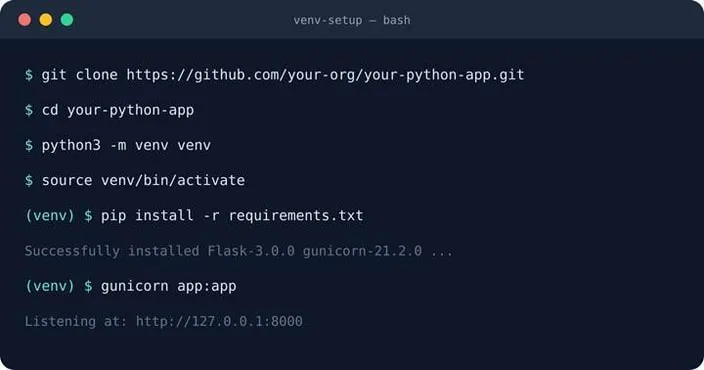
The virtual environment and dependency setup from this step, shown end to end.
Configure Environment Variables
Production apps almost always need configuration that shouldn't live in your code: database credentials, API keys, application secrets, and settings that switch between debug and production behaviour.
Environment variables are the usual way around this. A simple .env file might look like:
DATABASE_URL=postgresql://user:password@localhost/dbname
SECRET_KEY=your-secret-key
DEBUG=False
A .env file is only one way to supply these values, and Python doesn't load it automatically. Your app needs a library such as python-dotenv to read it. Alternatively, you can skip the file and provide the variables through the service environment instead, for example with an EnvironmentFile line in the systemd service file covered next. What matters here is the principle: keep the file itself out of Git (add it to .gitignore), and manage the real production values securely on the server rather than in your repository.
Run and Test the Application
Before putting Nginx in front of anything, run the app directly on the VPS and confirm it actually works.
Which application server you use depends on your framework:
Flask and Django apps are WSGI applications, and commonly run in production behind Gunicorn:
gunicorn app:appFastAPI apps are ASGI applications, and commonly run behind an ASGI server such as Uvicorn:
uvicorn main:appTreat app:app and main:app as examples, not universal commands. The part before the colon is the Python module containing your application object. The part after it is the variable name of that object. The actual value depends entirely on how your project is structured. It's worth knowing that Gunicorn can run with an ASGI worker class. This is one way FastAPI projects sometimes combine the two tools rather than using Uvicorn alone.
Keep the Python App Running
Running Gunicorn or Uvicorn directly over SSH works while your session stays open, but the moment that session closes, the process usually stops. That's not a full deployment; it's a temporary test.
systemd solves this by managing your app as a proper service: starting it, restarting it if it crashes, and bringing it back up automatically after a server reboot. A simplified service file might look like:
[Unit]
Description=My Python App
After=network.target

[Service]
User=your_user
WorkingDirectory=/path/to/project
ExecStart=/path/to/project/venv/bin/gunicorn app:app
Restart=always

[Install]
WantedBy=multi-user.target
Save this as a .service file under /etc/systemd/system/, then enable and start it with systemctl. From here, your app runs independently of any SSH session, which is what makes it a production deployment rather than a manual test run.
Once the service file exists, bring it online:
sudo systemctl daemon-reload
sudo systemctl enable your-app
sudo systemctl start your-app
sudo systemctl status your-app
daemon-reload tells systemd about the new file, enable sets it to start automatically on boot, start runs it now, and status confirms it's active and shows recent log output if something's wrong.
Put Nginx in Front of the App
With systemd keeping the app alive, the architecture now looks like this:
Visitor -> Domain -> Nginx -> Gunicorn/Uvicorn -> Python application
Your Python app can listen on an internal port, 8000 for example, that isn't exposed to the public internet. Nginx sits in front of it as a reverse proxy: it accepts incoming requests on the standard web ports and passes them through to your application server, then sends the response back to the visitor. In practice, this means Nginx handles the public-facing side (including HTTPS, once it's configured) while your Python process only has to deal with local traffic.
A minimal server block for this looks like:
server {
    listen 80;
    server_name example.com;

    location / {
        proxy_pass http://127.0.0.1:8000;
        proxy_set_header Host $host;
        proxy_set_header X-Real-IP $remote_addr;
        proxy_set_header X-Forwarded-For $proxy_add_x_forwarded_for;
        proxy_set_header X-Forwarded-Proto $scheme;
    }
}Production Nginx setups also handle things like additional server blocks, gzip, and rate limiting, covered in more detail in our dedicated guide on configuring Nginx for an app on a VPS.
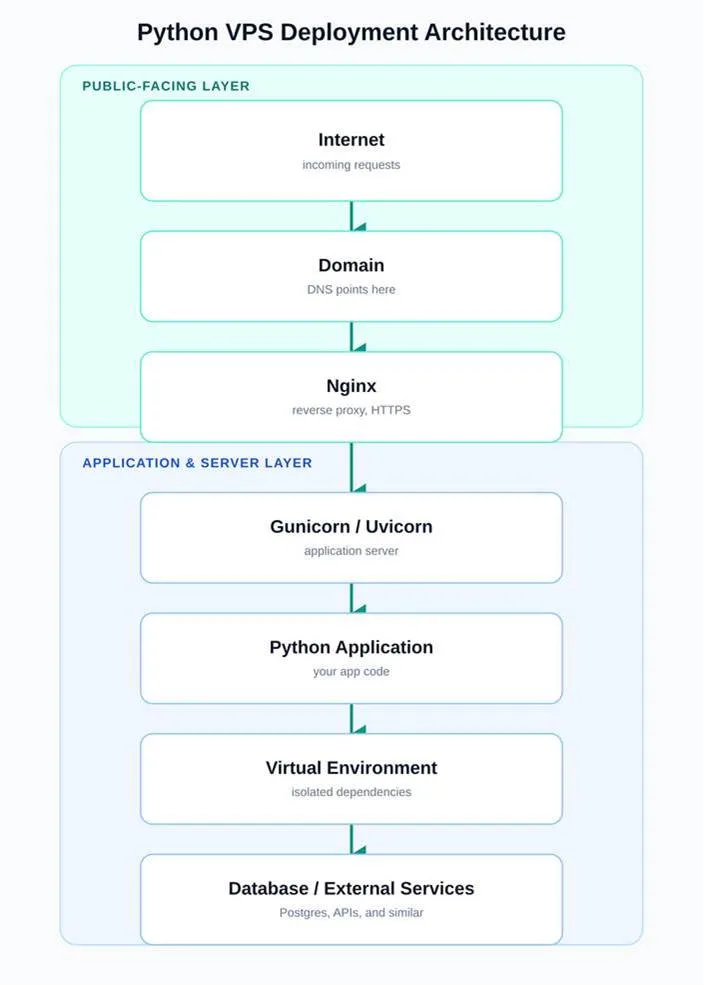
Nginx is the only layer exposed to the public internet; everything below it runs on an internal port.
Connect Your Domain and Add HTTPS
With the app running behind Nginx, four things remain:
- Point your domain's DNS records to the VPS's IP address.
- Add a server block in Nginx for that domain.
- Add HTTPS/SSL so traffic to your domain is encrypted.
- Visit the domain and confirm the app loads as expected.
Each of these deserves more space than fits here. For step 3, secure the site with an SSL certificate, such as a free Let's Encrypt certificate issued through Certbot.
How Do You Update the App?
The manual version of a deployment update follows a short, repeatable path:
Push to GitHub -> SSH into the VPS -> git pull -> activate the virtual environment -> update dependencies if needed -> restart the app
cd /path/to/project
git pull
source venv/bin/activate
pip install -r requirements.txt
sudo systemctl restart your-app
git pull only updates the code sitting on the server. It doesn't reinstall dependencies or restart the running process; both of those are separate, deliberate steps.
Doing this by hand is fine for occasional updates, but it doesn't scale well once you're shipping changes often. The natural next step is to automate it with GitHub Actions:
GitHub workflows can be set up to trigger on a push to a branch or when a pull request is opened, then run these same commands automatically across your GitHub repositories.
HostAfrica's Developer Tools, including the public API, CLI, and an MCP server, are also worth exploring if you want AI assistants or scripts to manage parts of this infrastructure directly. That's a separate topic from the deployment steps covered here, however.
A minimal workflow file might start like this:
on:
  push:
    branches: [main]

jobs:
  build:
    runs-on: ubuntu-latest
    steps:
      - uses: actions/checkout@v4
      - run: ssh user@your-server "cd /path/to/project && git pull && sudo systemctl restart your-app"
The manual update path. GitHub Actions can automate these same steps later.
Common Python Deployment Problems
| Problem | First thing to check |
|---|---|
| Wrong Python version | Run python3 --version and compare it against what the project expects |
| Virtual environment not activated | Confirm the prompt shows (venv), or re-run source venv/bin/activate |
| Missing packages | Re-run pip install -r requirements.txt inside the activated environment |
| Outdated requirements.txt | Compare it against what is actually imported in the code |
| Missing environment variables | Check that the .env file or systemd EnvironmentFile exists and is being loaded |
| Wrong application port | Confirm the port Gunicorn or Uvicorn binds to matches what Nginx proxies to |
| Gunicorn or Uvicorn not running | Check its status with systemctl status your-app |
| Nginx pointing to the wrong port | Review the proxy_pass line in the Nginx server block |
| App stops after the SSH session closes | Confirm it is running under systemd, not a bare terminal command |
| DNS or SSL not resolving | Check DNS propagation and certificate status before assuming a code issue |
FAQs: How to Deploy a Python App From GitHub to a VPS
How do I deploy a Python app from GitHub?
To deploy a Python application from GitHub, clone the repository onto a VPS, create a virtual environment, install the dependencies, run the app behind Gunicorn or Uvicorn, keep it alive with systemd, and put Nginx in front of it as a reverse proxy.
Can I host a Python app on a VPS?
Yes. A Linux VPS gives you full control over the Python version, installed packages, and any background processes or databases your app needs, which is exactly what a typical Flask, Django, or FastAPI deployment relies on.
Do I need a virtual environment on a VPS?
It's strongly recommended. It keeps your app's dependencies separate from the server's system Python and from any other projects sharing the same VPS.
Should I use Gunicorn or Uvicorn?
Flask and Django apps typically use Gunicorn. FastAPI apps typically use Uvicorn, since it's an ASGI server. Gunicorn can also run with an ASGI worker class if you'd rather standardise on one tool.
Can GitHub automatically deploy my Python app?
Not by itself, but GitHub Actions can automate the update steps (pulling code, installing dependencies, restarting the service) so deployment happens on every push rather than manually.
Conclusion
The whole workflow comes back to a short chain: GitHub stores the code, the VPS provides the environment, a virtual environment isolates the dependencies, Gunicorn or Uvicorn runs the Python application, and Nginx makes it publicly accessible.
For developers who want control over the Python version, packages, background processes, and any databases their app depends on, a HostAfrica Linux VPS gives you the runtime to deploy this way, without dictating how you build the app itself. From here, the natural next steps are configuring Nginx properly, adding HTTPS, and eventually automating updates with GitHub Actions.