From GitHub to a Live React App
Your React app runs fine locally with npm run dev (or npm start on Create React App), and the source sits in a GitHub repository. What's missing is a server and a domain.
Once built, a standard React app is just HTML, CSS, and JavaScript files. Deploying it means putting them where a web server can reach them, with no process to keep it alive.
The path is GitHub, then a Linux VPS, install dependencies, build, Nginx, and your domain. For the wider picture, see how to deploy an app from GitHub to a VPS. Commands are for Ubuntu or Debian, with AlmaLinux noted where it differs.
Key Takeaways
- You can deploy a React app from GitHub to a Linux VPS by cloning the repository, running
npm ciandnpm run build, and pointing Nginx at the build folder. - A built React app is static files: no PM2 and no Node.js server in production.
- Node.js is on the VPS only to build; nothing keeps running afterwards.
- React Router apps need an Nginx
try_filesrule, or refreshes return a 404. - Environment variables are baked into the bundle at build time and visible in the browser; never put secrets there.
- GitHub Pages is free for static sites; a VPS suits apps needing a backend or server control.
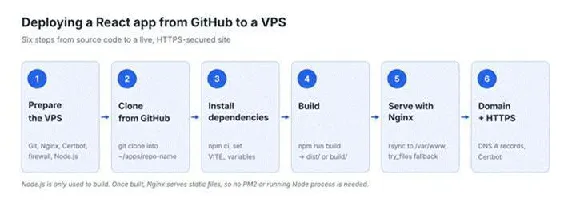
React deployment workflow: GitHub to live site in six steps.
What You'll Need
- A React project (Vite or an older Create React App project) in a GitHub repository
- A GitHub account
- A Linux VPS running Ubuntu, Debian, or AlmaLinux, with SSH access
- A non-root user with sudo privileges
- A domain, if the app must be publicly reachable
Step 1: Prepare Your VPS
Connect over SSH:
ssh username@YOUR_VPS_IPThen install Git, Nginx, and Certbot (used for HTTPS in Step 6). On Ubuntu or Debian:
sudo apt update
sudo apt install git nginx certbot python3-certbot-nginx rsync -y
On AlmaLinux, enable EPEL for Certbot with sudo dnf install epel-release -y, then run sudo dnf install git nginx certbot python3-certbot-nginx rsync -y. Start Nginx with sudo systemctl enable --now nginx.
Open the firewall. If a firewall is active and these ports aren't open, Nginx can't receive traffic, and Certbot will fail later. On Ubuntu with UFW:
sudo ufw allow OpenSSH
sudo ufw allow 'Nginx Full'
On AlmaLinux with firewalld:
sudo firewall-cmd --permanent --add-service=http --add-service=https
sudo firewall-cmd --reload
Install Node.js. Distribution repositories usually carry a version that's too old; use nvm. Check what your project expects first, usually an engines field in package.json.
Install nvm using the command in the nvm installation instructions, which always reference the current release. Then reload your shell and install your version:
source ~/.bashrc
nvm install 22  # or the version your project requires; nvm install --lts for the latest LTS
Confirm what you got:
node -v
npm -vStep 2: Clone the React App from GitHub
Copy the source into a predictable folder you'll return to for every update:
mkdir -p ~/apps && cd ~/apps
git clone https://github.com/username/repo-name.git
cd repo-nameStep 3: Install Dependencies and Set Environment Variables
Install what the project needs:
npm cinpm ci installs exactly the versions pinned in package-lock.json, which is more predictable on a server than npm install. Use npm install only when there's no lock file, or when you're deliberately changing versions.
If your app reads environment variables, set them before the build. Vite exposes variables prefixed VITE_; Create React App ones prefixed REACT_APP_; both are compiled into the bundle. Set them in a .env.production file in the project root.
Step 4: Build the React App for Production
npm run buildThis compiles your app into plain static files. Where they land depends on your tooling: Vite writes to dist, Create React App to build.
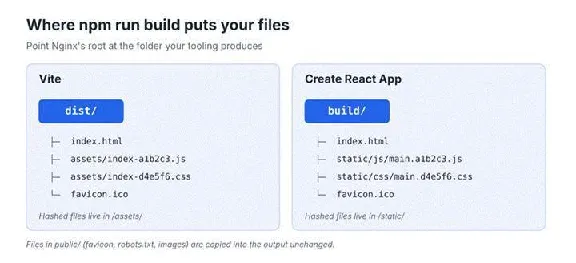
Build output: dist for Vite, build for Create React App.
Anything in your public folder, such as a favicon and robots.txt, is copied into the output unchanged.
Check it first: Vite has npm run preview; Create React App has npx serve build.
Step 5: Serve the React App With Nginx
Copy the build output into a folder Nginx will serve from (dist/ or build/):
sudo mkdir -p /var/www/my-react-app
sudo rsync -a --delete dist/ /var/www/my-react-app/
rsync includes hidden files that cp dist/* would miss, and --delete removes leftovers from an earlier deployment.
Now create a server block: /etc/nginx/sites-available/my-react-app on Ubuntu and Debian, or /etc/nginx/conf.d/my-react-app.conf on AlmaLinux.
server {
    listen 80;
    server_name example.com www.example.com;
    root /var/www/my-react-app;
    index index.html;

    location / {
        try_files $uri $uri/ /index.html;
    }

    # Always fetch the latest index.html; visitors get new deployments
    location = /index.html {
        add_header Cache-Control "no-cache";
    }

    # Vite's hashed asset files never change, cache them for a year
    # (Create React App uses /static/ instead of /assets/)
    location /assets/ {
        add_header Cache-Control "public, max-age=31536000, immutable";
    }
}
On Ubuntu and Debian, enable the site and remove the default one, which otherwise serves the Nginx welcome page:
sudo ln -s /etc/nginx/sites-available/my-react-app /etc/nginx/sites-enabled/
sudo rm /etc/nginx/sites-enabled/default
On every distribution, test the configuration and reload:
sudo nginx -t
sudo systemctl reload nginx
Always run nginx -t first, because reloading a broken config takes the site down.
The cache rules serve the newest index.html while keeping hashed assets cached. There's no PM2, reverse proxy, or application port.
HostAfrica's guide to Nginx basics explains how Nginx configuration files are structured.
Step 6: Connect Your Domain and Enable HTTPS
Point the DNS A records for example.com and www.example.com to your VPS's IP address, and make sure server_name matches. HostAfrica's guide to setting up DNS records walks through it.
Then add HTTPS with Certbot:
sudo certbot --nginx -d example.com -d www.example.comCertbot requests a free Let's Encrypt certificate, adds an HTTPS block on port 443, redirects HTTP to HTTPS, and sets up renewal. Afterwards, test the live domain, not the server's IP.
If you need a commercial certificate that verifies your business, HostAfrica also sells DV, OV, and EV SSL certificates.
How Do You Update a Deployed React App?
Commit and push to GitHub, then on the VPS:
cd ~/apps/repo-name
git pull
npm ci
npm run build
sudo rsync -a --delete dist/ /var/www/my-react-app/
Skip npm ci if package.json and package-lock.json haven't changed. The --delete flag matters: a plain cp adds new files but never removes old ones; stale bundles pile up.
Nginx doesn't need restarting; it reads whatever's in the web folder on the next request, and the no-cache rule gets visitors the new version.
Once this works manually, a GitHub Actions workflow can build and copy the output on every push to main, which removes the need for Node.js on the server.
Alternative: Deploy a React App to GitHub Pages
If your app is purely static, GitHub Pages hosts it for free, which suits a portfolio or demo.
The walkthrough uses Create React App with gh-pages. CRA is deprecated; use Vite for new projects, but many repositories still use CRA.
Install the gh-pages package as a dev dependency by running npm install with the --save-dev flag:
npm install gh-pages --save-devAdd a homepage field to package.json with your GitHub username and repository name, then add the deploy scripts. Without it, asset paths break, and you get a blank page:
"homepage": "https://username.github.io/repo-name",
"scripts": {
  "predeploy": "npm run build",
  "deploy": "gh-pages -d build"
}
Then deploy. npm runs the two scripts in order (predeploy runs npm run build, then deploy runs gh-pages -d build); one command builds the app and pushes the build folder to a gh-pages branch in your repository:
npm run deployFinally, open your repository's Settings, then Pages, and under Build and deployment choose Deploy from a branch and select the gh-pages branch. With the repository set to publish from that branch, your app is hosted on GitHub Pages at https://<username>.github.io/<repo-name>, where <username> is your GitHub username.
Free plans need a public repository. Private repositories need a paid GitHub plan.
Vite projects differ. Change the deploy script to gh-pages -d dist, and set base: '/repo-name/' in vite.config.js instead of a homepage field; otherwise the app loads blank once deployed to GitHub Pages.
React Router needs a workaround. Pages has no try_files equivalent; /about returns a 404 on refresh:
- HashRouter. Swap
BrowserRouterforHashRouter; routes becomeexample.com/#/about, and refreshes work because nothing after the#reaches the server. A one-line change that always works. - A 404 fallback. Keep
BrowserRouter, setbasename="/repo-name", and add a404.htmlredirecting toindex.htmlwith the original path preserved. Cleaner URLs, but fiddlier.
Where Should You Host Your React App?
| Consideration | GitHub Pages | Linux VPS | Application Hosting |
|---|---|---|---|
| Best use case | Simple static sites | Frontend plus your own services | A ready-made stack |
| Server administration | None | You manage it | You manage it, stack pre-installed |
| Custom configuration | Domain and HTTPS only | Full control of Nginx and the OS | Full root access |
| Backend and database | Needs external services | Runs alongside the frontend | Backend stacks included |
| Private repositories | Paid plans only | No restriction | No restriction |
| Cost | Free within GitHub's limits | Monthly plan, billed in rand | Same as the VPS plan |
A Linux VPS is a bare server with no application stack, which is why Steps 1 to 5 exist. HostAfrica's Application Hosting is the same server with Docker, Supabase, or n8n pre-installed, with full root access either way.
What About Next.js or Docker?
Not every React project is static once built. A Next.js app with server-side rendering needs a live Node.js process, a reverse proxy, and something like PM2; see how to deploy a Next.js app from GitHub to a VPS.
Docker packages the app and its dependencies into a container instead. HostAfrica's Docker setup guide covers installing it on a fresh server.
Common React Deployment Problems
| Problem | Likely cause | What to check |
|---|---|---|
| Blank page, no errors | Wrong base path or homepage value | base in vite.config.js, or homepage in package.json |
| 404 when refreshing | Missing Nginx fallback | The try_files line in your server block |
| Old version showing | Files not copied, or index.html cached | Rebuild, re-copy, check the no-cache rule |
| Environment variable undefined | Wrong prefix, or set after the build | The prefix; set it before building |
| Assets missing or 404 | Nginx pointing at the wrong folder | dist versus build in your root directive |
| Permission errors | Nginx can't read the web folder | Permissions; on AlmaLinux, SELinux labels |
| Certbot fails, or domain won't resolve | DNS not pointing at the VPS, or port 80 blocked | A records, propagation, firewall rules |
Most of these have more than one cause. Work from the simplest explanation, and check /var/log/nginx/error.log when it isn't obvious.
FAQ
Do I need Node.js on my VPS to run a React app?
Only to build it. The output is static files that Nginx serves on its own; build in GitHub Actions instead, and the server needs none.
Why does my React app show a 404 on refresh?
React Router handles routes in the browser; /about isn't a real file. Add try_files $uri $uri/ /index.html; to the location / block in your Nginx config.
Can I deploy a React app from GitHub for free?
Yes. A static React app can be deployed to GitHub Pages for free, as long as the repository is public on a free plan. You'll need a VPS once the app needs a backend.
Do I need PM2 for a React app?
No. PM2 keeps a long-running process alive, and a built React frontend doesn't have one. You'd need it only if the server also runs a Node.js backend; see how to deploy a Node.js app from GitHub to a VPS.
Can GitHub deploy a React app automatically?
Yes. A GitHub Actions workflow can build and copy the output to your VPS over SSH on every push to your main branch.
Conclusion
The model explains every step: GitHub stores your source, npm run build turns it into static files, Nginx serves those files, and your domain plus an HTTPS certificate make them public. Nothing needs supervising.
If you want a React frontend alongside your own API or database, a HostAfrica Linux VPS gives you the Ubuntu, Debian, or AlmaLinux server this guide assumes, hosted locally and billed in rand. Prefer your stack pre-installed? See Application Hosting.