You asked an AI tool for a booking app, and an hour later you had a Next.js app with a dashboard, a contact form, and a database. Impressive. Then the client asks for the link, and you realise nobody mentioned where the thing is supposed to live.
The good news: once you know what a Next.js app needs in production, choosing where to host it gets a lot simpler. This guide explains how to host a Next.js app, what decides whether yours needs a server, and how the main hosting options compare, so you can pick the setup that fits your project rather than the first one that shows up in a search. New to app hosting in general? Start with our guide to web app hosting.
Key Takeaways: How to Host a Next.js App
- Most Next.js apps need a running Node.js server. Server-side rendering, API routes, and server actions all need one.
- Only a static export can skip the server, and it gives up those features.
- Production needs more than a server: a build step, process management, environment variables, a domain with SSL, and usually a database.
- A VPS gives you control; a managed platform gives you time. On a managed platform, the build, restarts, and SSL are handled for you.
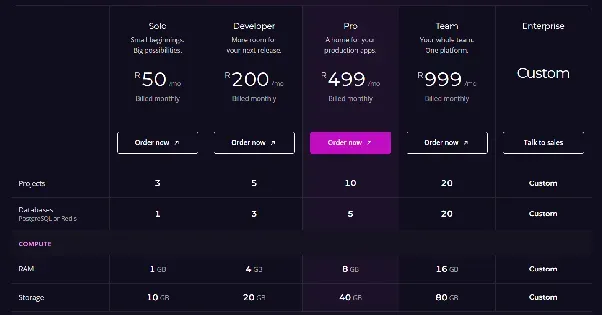
- HCode hosts Next.js apps in South Africa from R50 a month, with managed PostgreSQL included.
What Do You Need to Host a Next.js App?
To host a Next.js app in production, you need six things, whoever ends up providing them.
- A Node.js runtime. Next.js is a Node.js app under the hood, so the server needs a Node.js version your project supports.
- A production build. Running
next devis for your laptop. In production, the app is built once withnpm run build, then started from that build. - Process management. Something has to start your Next.js app, keep it running, and restart it after a crash or a reboot.
- Environment variables. API keys and database passwords live on the server, never in your code. Anything starting with
NEXT_PUBLIC_ends up in the browser, so secrets don't belong there. - A domain and SSL. Visitors expect your own address and a padlock in the browser bar.
- A database, if your app saves anything: users, bookings, orders, or form entries.
The real question when you choose a host is simple: which of these six do you want to handle yourself, and which do you want handled for you?
Does Next.js Need a Server?
Usually, yes. Unless your Next.js app is configured as a static export, it needs a running Node.js server.
Next.js can build your app two ways. A static export turns every page into plain HTML, CSS, and JavaScript files ahead of time, which any static host can serve. A server-rendered app runs as a live Node.js process that builds pages and answers requests as they arrive.
The catch is that a static export can't do anything that needs work at request time. If your app uses any of these, it needs a server:
| Feature | What it does | Works as a static export? |
|---|---|---|
| Server-side rendering | Builds a page fresh for each visitor | No |
| API routes (route handlers) | Your app's own backend endpoints | Only if they return the same result every time |
| Server actions | Form submissions and data changes handled on the server | No |
| Middleware | Checks requests first, for example to see who's logged in | No |
| Built-in image optimisation | Resizes and compresses images on demand | No, unless you use a separate image service |
| Reading cookies or headers | Personalises pages per visitor | No |
A quick test: if your app has logins, saves form entries, or shows different content to different people, it needs a server. Most real-world Next.js apps do, which is why the choice of host matters.
Where to Host a Next.js App: Your Options
There are four realistic places to host a Next.js app, and they differ in how much of that six-item list lands on your plate.
A static host works only for a static export. It's simple and cheap, but the server features in the table above won't work.
Shared hosting is built mainly for PHP websites. Some plans offer a Node.js option, but they're rarely designed to keep a Next.js server running around the clock, and you'll usually still need somewhere else for the database.
A VPS runs anything, Next.js included. You install Node.js, build the app, set up process management, configure a web server in front of it, and add SSL. You also look after updates, security, and backups from then on.
A managed app platform builds and runs the app for you. You connect your repository, and the platform handles the build, the restarts, and HTTPS. Vercel is the best-known example; if you're weighing it up, our guide to Vercel alternatives covers the options for South African developers.
| Option | Runs server features | Who handles the build and restarts | Database |
|---|---|---|---|
| Static host | No | Not needed | Separate service |
| Shared hosting | Rarely well | Mostly you | Usually MySQL, not PostgreSQL |
| VPS | Yes | You | You install and maintain it |
| Managed app platform | Yes | The platform | Often included or one click away |
Process Management: Who Keeps Your App Running?
Process management is the job of starting your Next.js app, keeping it alive, and bringing it back when something goes wrong. It's the part of hosting most people only notice once their app goes down.
When you start a Next.js app by hand, it runs only as long as the terminal that started it. Close the session, and the app may stop with it. A crash at 2 a.m. stays a crash until someone notices. A server reboot after an update leaves the app offline until someone starts it again.
On a VPS, you solve this with a process manager such as PM2, which runs the app in the background, restarts it after a crash, and starts it again after a reboot. It works well, but it's one more tool to install, configure, and check.
On a managed platform, process management is part of the service. The platform runs your app, watches it, and restarts it for you. Think of it as the difference between owning a car and calling a taxi: both get you there, but only one makes you deal with the flat tyre.
Where Does the Database Go?
If your Next.js app saves anything, it needs a database, and where that database lives affects both speed and cost.
Most Next.js apps pair well with PostgreSQL, the open-source database behind a large share of modern web apps. You have three choices:
- Run it yourself on a VPS. It's cheap, but backups, updates, and security are your job.
- Use a separate database service. It's convenient, but it's a second account and a second bill, and the database may run in a different country from your app.
- Use a platform that includes it. The database sits next to your app, on the same bill, with backups handled.
Distance matters more than most people expect. Every page that reads from the database waits for that query to come back. When your app and database sit in the same data centre, that wait is short. When they're on different continents, every page pays the toll. Need more detail? Our PostgreSQL hosting page explains how HCode's managed database works.
How to Host a Next.js App on HCode
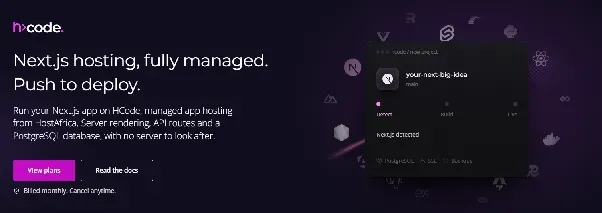
HCode is HostAfrica's managed app platform, and it takes care of all six items on the production checklist for you. Hosting a Next.js app on it takes three steps:
- Pick a plan. Choose one on the Next.js hosting page. Plans start at R50 a month, and code HCODEFREE2026 makes your first month free.
- Connect your code. Link your GitHub repository or upload a .zip, then add your environment variables in the panel, where they're stored encrypted.
- Push. HCode detects Next.js, installs dependencies, runs the production build, and serves your app over HTTPS. Every push after that deploys a fresh build.
Here's how that maps to the checklist:
| What a Next.js app needs | On HCode |
|---|---|
| Node.js runtime | Detected and set up for you |
| Production build | Runs on every push; a failed build never replaces the live app |
| Process management | Your app runs on a Node.js process that HCode keeps running |
| Environment variables | Set in the panel, stored encrypted |
| Domain and SSL | Free subdomain straight away; custom domain with automated SSL |
| Database | Managed PostgreSQL included, beside your app, backed up daily |
Server-side rendering, route handlers, and server actions all work, and static exports deploy too. Your app and database run in South Africa on one flat price in rand, and if a release misbehaves, you can roll back to the last good one in a click. Need an API or a background worker alongside it? Run a Node.js API or a Python worker as its own app on the same platform.
Prefer to Run It Yourself?
If you want full control over the server, the Node.js version, and every config file, a VPS is a solid route. Our step-by-step guide shows you how to deploy a Next.js app from GitHub to a VPS, from the first SSH login to a live domain with HTTPS.
FAQs: Hosting a Next.js App
Where Should I Host a Next.js App?
If your app uses server features like server-side rendering or server actions, host it somewhere that runs Node.js: a managed app platform or a VPS. A managed platform handles the build, restarts, and SSL for you; a VPS gives you full control.
Does a Next.js App Need Node.js to Run?
Yes, unless it's a static export. Server-rendered pages, API routes, and server actions all run on a Node.js server.
Can you Host Next.js on Shared Hosting?
Only in limited cases. Shared hosting is built mainly for PHP websites, and few plans are designed to keep a Next.js server running reliably. A static export can work on shared hosting, but it loses the server features.
Can I Host a Next.js App for Free?
Some providers offer free tiers, usually with limits such as non-commercial use only or apps that sleep when idle. HCode has no free tier, but code HCODEFREE2026 gives you your first month free.
How Much Does it Cost to Host a Next.js App?
It depends on the setup. On HCode, plans start at R50 a month with a PostgreSQL database included. On a VPS, you pay for the server and spend your own time running it.
Can I Host a Next.js App in South Africa?
Yes. HCode runs your Next.js app and its database in South Africa, billed in rand, which keeps requests short for local users.