Your app has run on Heroku for years without a hiccup. That's exactly the problem: nobody on the team remembers the setup. Then Heroku's February 2026 announcement turned "one day we should move" into a planning item.
If you're planning to migrate from Heroku, this guide explains what the move involves, compares the main hosting options, and shows how to transfer your app and PostgreSQL database to HCode, HostAfrica's app hosting platform.
Heroku details checked against Heroku's blog, pricing page, and Dev Center in November 2026.
Key Takeaways: Migrating From Heroku
Heroku isn't shutting down. Its focus has shifted to the platform's stability, security, and reliability rather than new features at the same pace; you can plan your move on your own schedule.
- Status: Heroku runs on a "sustaining engineering model" focused on stability, security, reliability, and support.
- The job: Plan for code, configuration, data, DNS, and any add-ons or external services your app depends on.
- AWS: Full control, but you take on the ops work Heroku used to do for you.
- HCode: Offers Git-based deployment, environment variables, and managed PostgreSQL, with South African hosting from R50 a month.
Should You Migrate From Heroku Now?
On 6 February 2026, Heroku announced it's moving to a "sustaining engineering model" focused on stability, security, reliability, and support. In plain words, it will keep the platform running well rather than build lots of new things. Heroku still describes itself as an "actively supported, production-ready platform".
Customers who pay by credit card see no changes to pricing, billing, service, or day-to-day use. Enterprise Account contracts are no longer offered to new customers, but existing ones are honoured and can renew.
There's no emergency. It's still worth planning a move if:
- A contract renewal is coming up.
- Your dollar bill keeps growing as the rand moves.
- Your roadmap depends on new platform features.
Plan the move on your terms, not theirs.
What a Heroku Migration Actually Involves
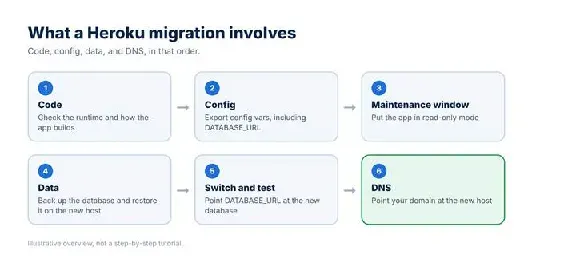
Every move has four parts. None is hard on its own; the trick is doing them in the right order.
Code
Your Heroku app's code usually moves as is. Check your runtime version and how the app builds. Heroku uses buildpacks, scripts that detect your language and build your app, and most platforms have an equivalent. Also look for anything Heroku-specific, such as add-ons or temporary file storage, which may need changes even if the code doesn't.
Config
Heroku stores settings as config vars, including the DATABASE_URL that tells your app where its database lives. Export them and recreate them as environment variables on the new platform.
Data
Moving your Heroku Postgres databases needs the most care. The usual pattern is a short maintenance window: put the app in read-only mode so nothing new is written, back up the database, restore it on the new host, then switch the app over.
Very large databases sometimes replicate data in real time to keep downtime to minutes. Most small apps don't need that, and a short window is simpler. Heroku recommends its backup tool for moderately loaded databases up to 20 GB; bigger or busier ones may need another strategy. Test the backup and restore first.
DNS
Finally, point your domain at the new host. Lowering your DNS TTL (how long servers cache your DNS records) 24 hours before the move helps the changes take effect faster.
How Heroku Concepts Map to HCode
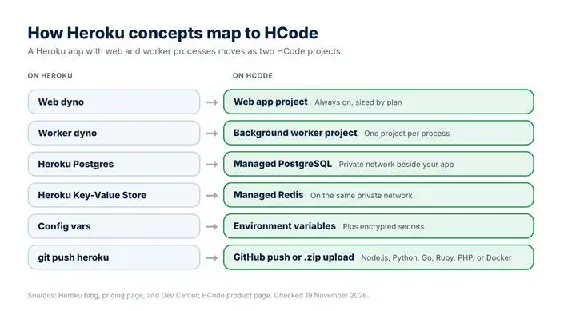
If you know Heroku, most of HCode will feel familiar.
| On Heroku | On HCode |
|---|---|
| Dynos and process types | Separate HCode projects, always on, sharing your plan's resources |
| Buildpacks | Automatic detection for Node.js, Python, Go, Ruby, and PHP, or your own Dockerfile |
| Procfile | One project per process: a web process becomes a web app, and a worker becomes a background worker |
| Config vars | Environment variables and encrypted secrets |
git push heroku | Push to a connected GitHub repository, or upload a .zip |
| Heroku Postgres | Managed PostgreSQL on a private network |
| Heroku Key-Value Store | Managed Redis, available as a database option |
| Custom domains and SSL | Custom domains with SSL |
| Release rollback | Roll back to the last good release with one click |
| Review apps | Not available yet |
| Elements add-on marketplace | No marketplace; connect external services through environment variables |
A Heroku app with web and worker processes moves as two HCode projects; plan your memory across both. One-off commands, such as database migrations, need their own execution step; check how you'll run them on HCode rather than folding them into the build. The HostAfrica team can help you plan this and how the two projects share data.
To be fair to Heroku, it has a much broader add-on marketplace and supports a wider range of application stacks. HCode supports its listed languages directly, and stacks can run through a Dockerfile.
Most of what you know carries over; the learning curve is short.
Moving Your Heroku Postgres Database
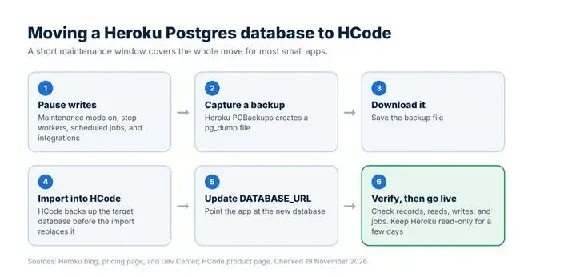
Here's the database move in plain steps.
- Pause writes. Turn on Heroku's maintenance mode to block web traffic. It doesn't stop worker dynos or scheduled jobs; stop those and any integrations that write to the database, then confirm nothing is still changing data.
- Capture a backup. Heroku's PGBackups tool takes a backup with
heroku pg:backups:capture. Behind the scenes, it's a compressed pg_dump file. - Download it. Save the backup file to your computer.
- Import it into HCode. HCode imports a .sql file or pg_dump archive into managed PostgreSQL, and it backs up the existing database before an import replaces it.
- Update
DATABASE_URL. Point your app's environment variable at the new database. - Verify the app. Check that the expected records are there, the app can read and write data, and background jobs run before you switch production traffic.
Migrating From Heroku to AWS
Moving from Heroku to AWS gives you more control and access to a wide range of services. You also have to build what Heroku used to hand you. It's like swapping a full-service flat for an empty plot and a set of building plans.
Here's what's involved:
- Compute: run your app on EC2, ECS, or a similar service.
- Database: move your Heroku Postgres data into an Amazon RDS database, AWS's managed database service. Moving databases to Amazon uses the same backup-and-restore pattern, or AWS's migration service for bigger ones.
- Networking: design private networks, firewall rules, load balancers, and certificates.
- Infrastructure as code: most teams describe all of this in code; it can be rebuilt and reviewed.
AWS suits teams with DevOps skills or AWS credits to spend. If you migrate from Heroku to Kubernetes, you also manage containers, clusters, and deployments. It suits teams that need that control, but it's rarely the simplest option for a small app.
The real cost of AWS is time: someone has to design it, run it, and answer the alerts.
Where to Go After Heroku
If you're considering a move, the main options are a cloud provider like AWS, a Linux VPS, a managed platform like Render, or a hosting platform like HCode. Here's how they compare.
| Destination | Setup effort | Who manages servers | Database | Billing | Where data lives |
|---|---|---|---|---|---|
| AWS (or Kubernetes) | High | You | Amazon RDS, set up by you | US dollars, by usage | The AWS region you choose |
| Linux VPS | Medium | You: patching, security, and backups | You install and run PostgreSQL | Fixed monthly price | Depends on the provider |
| Render | Low | The platform | Managed Postgres | US dollars | Regions outside South Africa |
| HCode | Low | HostAfrica | Managed PostgreSQL included; Redis available | Flat monthly price in rand | South Africa |
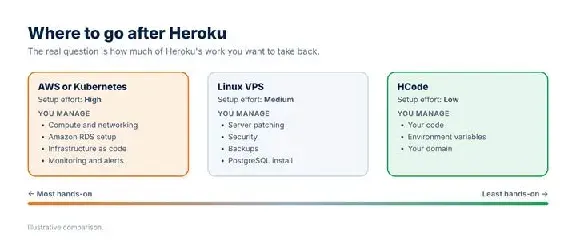
If you want to keep Heroku's way of working, HCode is the shortest move.
Your Heroku Migration Checklist
- List your add-ons and decide what replaces each one.
- Export your config vars.
- Check your runtime and language versions.
- Confirm how database migrations and other one-off commands will run on the new platform.
- Plan a maintenance window and tell your users.
- Stop worker processes, scheduled jobs, and integrations that write to the old database.
- Back up and restore the database.
- Test everything on the new URL.
- Switch DNS.
- Keep Heroku running read-only for a few days.
- Cancel Heroku once you're sure.
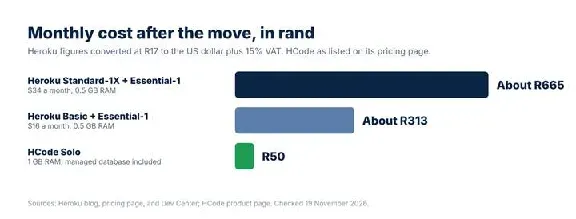
What It Costs After the Move
| Setup | Monthly price | In rand |
|---|---|---|
| Heroku Basic dyno + Postgres Essential-1 | $16 | About R313 |
| Heroku Standard-1X dyno + Postgres Essential-1 | $34 | About R665 |
| HCode Solo, with a managed database | R50 | R50 |
Heroku prices are in US dollars. Rand estimates use an approximate exchange rate of R17 to the dollar and include an estimated 15% VAT. Actual costs may vary depending on exchange rates, taxes, and billing arrangements. HCode prices are taken directly from its pricing page.
This is a starting-price comparison, not a performance benchmark. Both Heroku dynos have 0.5 GB of RAM. HCode Solo includes 1 GB, 3 projects, and 1 database: room for a web app and a worker, though your workload decides whether it's enough.
Our Recommendation
Moving off Heroku? Choose HCode.
HCode keeps the way of working Heroku users already know, and adds local hosting and rand pricing:
Heroku's workflow
push from Git, set environment variables, and let the platform run things.
Managed PostgreSQL
included on every plan.
Local hosting and rand pricing
your app and data in South Africa, from R50 a month.
Would you rather run the server yourself? A HostAfrica VPS gives you your own server at a fixed monthly price. It suits teams with the skills to set it up and maintain it.
FAQs: Migrating From Heroku
Is Heroku Shutting Down?
No. Heroku is still supported but moved to a sustaining engineering model in February 2026. It calls itself an actively supported, production-ready platform, and credit card customers see no changes to pricing or service.
How Long Does a Heroku Migration Take?
It depends on your database size, background processes, add-ons, and testing needs. Preparation usually takes longer than the move, which may only require a short maintenance window for a small app.
Can I Migrate My Heroku Postgres Database Without Downtime?
A short maintenance window often suits smaller apps. Larger databases may need a more involved strategy, such as real-time replication, depending on what the destination supports.
What Replaces Heroku Add-Ons?
It depends on the add-on. Some can stay as external services, while others need an equivalent on your new platform. HCode includes managed PostgreSQL and offers Redis as a managed database option.
Should I Migrate From Heroku to AWS?
If your team has DevOps skills or AWS credits, it can make sense. If you chose Heroku to avoid managing servers, AWS brings that work back.
What Should I Check Before Migrating From Heroku?
Your runtime version, environment variables, add-ons, workers, scheduled jobs, and database. Test the backup and restore before switching traffic.
Can I Move My Heroku App Without Changing Its Code?
Often, yes, though you may need to adjust build settings, environment variables, and anything tied to Heroku-specific services.
Does HCode Support Docker?
Yes. HCode builds Node.js, Python, Go, Ruby, and PHP apps, or from your own Dockerfile.