It started as a contact form on a Netlify site. Then the client wanted bookings. Then reminder messages every hour. Then a Python script that checks the calendar and tidies up no-shows.
Somewhere along the way, you started wondering whether a Netlify backend can handle all of that. The frontend is fine. The backend just outgrew the building.
This guide explains what Netlify Functions and the new Netlify Server can run, where their limits are, and why HostAfrica's HCode makes a better home for a backend that's outgrown them.
Checked against Netlify's documentation, changelog, and pricing page in November 2026.
Key Takeaways: Netlify Backend at a Glance
Netlify supports backend code through serverless Functions and the newer Netlify Server, which runs long-lived Node.js apps. Netlify Database adds managed Postgres.
- Functions: Run per request, with limits of 60 seconds (standard), 30 seconds (scheduled), and 15 minutes (background).
- Netlify Server: Runs Node.js apps with WebSockets and in-memory state, but it's in Early Access and scales to zero when idle.
- Languages: Functions run JavaScript, TypeScript, and Go. Netlify Server runs Node.js. Python, PHP, and Ruby need another host.
- Database: Netlify Database is managed Postgres on credit-based plans, paid for with credits.
- HCode: Runs always-on apps and background workers with managed PostgreSQL from R50 a month, hosted in South Africa.
Does Netlify Support a Backend?
Yes. Netlify offers two ways to run backend code. Functions handle individual requests and scheduled or background tasks. Netlify Server runs a longer-lived Node.js app that keeps connections and in-memory state between requests, though it's still in Early Access and scales down when idle. Netlify Database stores the data.
Short answer: yes, within limits. Functions are capped by time and language, and Netlify Server is still in Early Access. If you need another language, a South African region, or workers that never stop, you'll hit those limits quickly.
How Netlify Runs Backend Code
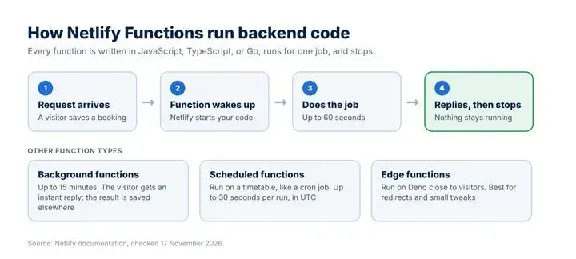
A serverless function runs code only when needed. You put it in your project's netlify/functions folder, and Netlify deploys it with the rest of your site. That's how to deploy a backend on Netlify: push to Git, or run netlify deploy from the Netlify CLI, and each function goes live as an API endpoint.
Netlify Functions
Standard functions handle requests from your frontend, such as saving a booking. You can write them in JavaScript, TypeScript, or Go. Each function can run for up to 60 seconds (the execution limit).
Background Functions
Background functions run for up to 15 minutes. The visitor gets an instant reply while the function keeps working, but you have to save the result somewhere yourself.
Scheduled Functions
Scheduled functions run on a timetable, like a cron job (a task set to run at fixed times, in UTC). They're capped at 30 seconds. For longer work, a scheduled function has to hand off to a background function, which is still capped at 15 minutes.
Edge Functions
Edge functions run on Deno, close to your visitors. They're limited to small jobs like redirects and page personalisation, not heavy backend work.
Netlify Server: A Longer-Running Backend
Netlify launched Netlify Server in Early Access on 10 November 2026. It runs your backend as a long-lived Node.js app, and you can bring an existing Express, Fastify, Hono, or Koa app as it is.
Unlike a function, a server instance handles many requests at once, keeps database connections and caches in memory, and holds WebSocket and Server-Sent Events (live updates pushed to the browser) connections open.
During Early Access, the limits matter:
- Node.js only: you write it in JavaScript or TypeScript.
- Scales to zero: an instance stops after 5 minutes without requests.
- Request time: up to 30 minutes, or 2 hours on Pro and higher plans.
- Instance lifetime: each instance is replaced after 8 hours, even if it's busy.
- Scale: up to 3 instances, or 1 on Free and Personal plans.
- Regions: US East (Ohio) by default, or EU (Frankfurt).
- Frameworks: Next.js, Astro, Nuxt, and SvelteKit still use Functions.
It's free during Early Access; Netlify plans to bill for reserved memory and active CPU time later, so today's cost doesn't reflect what you'll pay.
Serverless Functions vs Netlify Server vs HCode
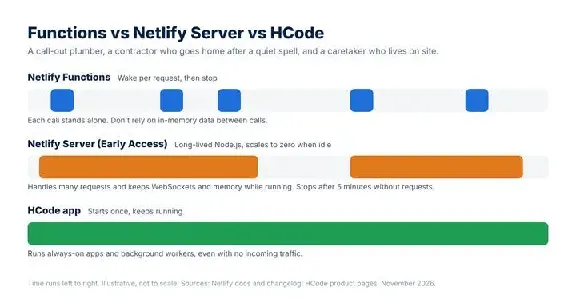
Serverless Functions: Run one task and stop, so you shouldn't rely on in-memory data surviving between calls.
Netlify Server: Keeps connections and memory until it scales down when idle.
HCode: Runs a managed app that stays running in South Africa, with background workers beside it.
A function is a call-out plumber who leaves after each job. Netlify Server is a contractor who goes home after a quiet spell. An HCode app is the caretaker who lives on site.
| What you need | Netlify Functions | Netlify Server | HCode |
|---|---|---|---|
| WebSockets | No | Yes | Yes, in a running app |
| In-memory state between requests | Not guaranteed | Yes, while the instance runs | Yes |
| Work longer than 15 minutes | No | Requests up to 30 minutes, or 2 hours on Pro | Long-running processes |
| Workers and bots with no incoming traffic | No | No, it scales to zero when idle | Yes |
| Languages | JavaScript, TypeScript, Go | Node.js | Node.js, Python, Go, PHP, Ruby, Docker |
On cost, Functions bill by usage, Netlify Server is free until Netlify starts billing it, and HCode charges a flat monthly price.
Back to our booking system: the hourly reminder only stays on Netlify if it finishes within a scheduled function's 30 seconds. The Python script can't run on Netlify Functions or Netlify Server at all.
Netlify Database
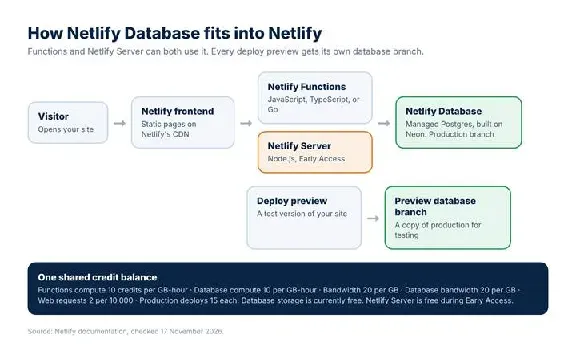
Netlify Database is fully managed Postgres, built on Neon and integrated into Netlify. It became generally available on 28 April 2026; older articles that say Netlify has no database are out of date.
It's available on credit-based plans only. When a database is active, it uses credits for compute and bandwidth. Storage is currently free, and Netlify says it will give notice before it starts charging.
Each deploy preview also gets its own database branch, copied from production, so you can test changes without touching live data. HCode doesn't offer preview deployments yet.
Netlify Database Pricing
Netlify Database doesn't have its own monthly price. It draws from the same credit balance as your functions, bandwidth, and deploys.
| Plan | Price | Credits a month | In rand | Extra credits |
|---|---|---|---|---|
| Free | $0 | 300, hard limit | R0 | Not available |
| Personal | $9 a month | 1,000 | About R176 | 500 for $5 (about R98) |
| Pro | $20 a month, unlimited members | From 3,000 (tiers up to 20,000) | About R391 | 1,500 for $10 (about R196) |
Netlify bills in US dollars. The rand amounts are illustrative conversions at R17 to the dollar, plus 15% VAT.
Here's what uses those credits. A GB-hour combines memory and running time: 1 GB of memory working for one hour.
| What you use | Credits |
|---|---|
| Functions compute | 10 per GB-hour |
| Database compute | 10 per GB-hour |
| Web bandwidth | 20 per GB |
| Database bandwidth | 20 per GB |
| Web requests | 2 per 10,000 |
| Production deploys | 15 each |
Personal's 1,000 credits would cover 50 GB of bandwidth if you spent them on nothing else. In practice, everything shares that pot, so a busy month on one service leaves less for the rest.
Where Your Backend Runs Matters
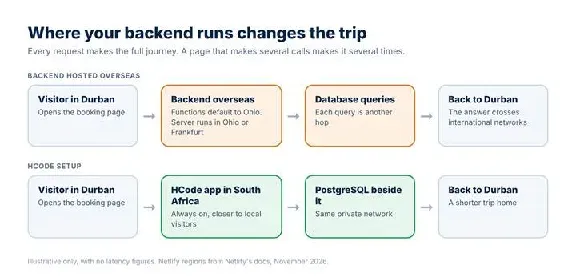
Netlify Functions default to US East (Ohio), and you can choose from a list of other regions. Netlify Server also defaults to Ohio, with Frankfurt as its only alternative.
Picture a visitor in Durban opening the booking page. If the backend and database are hosted overseas, every request crosses international networks and back, and several database calls per page add to that round trip.
HCode runs your app and database on South African infrastructure, connected over a private network, which shortens the distance to a mostly South African audience.
When Your Backend Outgrows Netlify
Your backend has probably outgrown Netlify if:
- You need Python, Ruby, PHP, or another language beyond Node.js and Go.
- You need a worker or bot that keeps running with no incoming traffic.
- You want your backend hosted in South Africa.
- You want a predictable monthly bill in rand, not credits in dollars.
If any of these sound familiar, HCode covers all four.
Netlify Backend vs HCode
| What you need | Netlify | HCode |
|---|---|---|
| How backend code runs | Functions, plus Netlify Server (Early Access) | Managed, always-on app hosting |
| Languages | Functions: JavaScript, TypeScript, Go. Server: Node.js | Node.js, Python, Go, PHP, Ruby, or your own Dockerfile |
| Time limits | Functions: 60 seconds, 30 seconds (scheduled), 15 minutes (background). Server: 30 minutes per request, or 2 hours on Pro | Long-running apps and workers |
| Database | Netlify Database (Postgres), paid with credits | Managed PostgreSQL included, Redis available |
| Billing | Plan price plus credits, in US dollars | Flat monthly price in rand |
| Where it runs | Ohio by default; other regions vary by service | South Africa |
| Preview deploys | Yes, with a database branch per preview | Not yet |
Netlify details come from its documentation and pricing page. HCode details are as listed on the HCode product pages in November 2026.
Here's the HCode plan ladder. Annual billing saves up to 8%.
| Plan | Price | RAM | Projects | Databases | Storage | Backups kept |
|---|---|---|---|---|---|---|
| Solo | R50 a month | 1 GB | 3 | 1 | 10 GB | 3 days |
| Developer | R200 a month | 4 GB | 5 | 3 | 20 GB | 7 days |
| Pro | R499 a month | 8 GB | 10 | 5 | 40 GB | 30 days |
| Team | R999 a month | 16 GB | 20 | 20 | 80 GB | 60 days |
Keep Netlify, Move the Backend
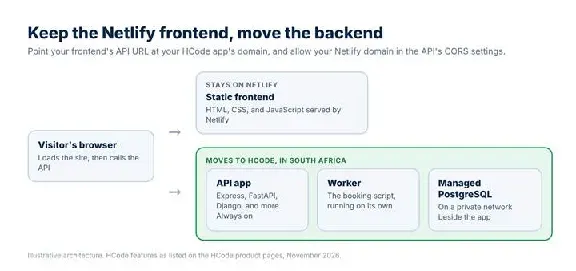
You don't have to move everything at once. Leave your static frontend on Netlify and run the backend on HCode.
- Deploy your API on HCode from GitHub or a .zip, using our Express hosting or, for that booking script, Python hosting.
- Add a database. Create managed PostgreSQL hosting on the same plan, beside your app.
- Point your frontend at the API. Change your frontend's API URL to your HCode app's domain.
Ready to bring the frontend over too? HCode also hosts React, Vue, and Next.js frontends, so your whole app can live on one platform with one bill.
Our Recommendation
Growing backend? Choose HCode.
Netlify can run backend code, but it comes with function time limits, a short list of languages, overseas regions, and billing in dollar-based credits. Netlify Server, its answer to long-running apps, is still in Early Access.
HCode is built for the work those limits get in the way of:
Always-on workers and bots
processes that run with or without traffic.
Long-running apps
your backend stays running instead of starting and stopping per request.
More languages
Node.js, Python, Go, PHP, Ruby, or your own Dockerfile.
A database beside your app
managed PostgreSQL on the same plan.
Local hosting and rand pricing
your app and data in South Africa, from R50 a month.
You don't have to move everything at once. Start with the backend and leave your frontend where it is, or bring the whole app across, since HCode also hosts React, Vue, and Next.js frontends.
Frequently Asked Questions
Can Netlify Host a Backend?
Yes, through Netlify Functions and Netlify Server, within limits. Functions are capped by time and language, and Netlify Server is in Early Access, with limits on scaling, regions, and idle time.
What Is Netlify Server?
Netlify's long-running Node.js backend, in Early Access since 10 November 2026, with WebSockets and in-memory state.
Does Netlify Have a Database?
Yes. Netlify Database is a managed Postgres database, available since April 2026 on credit-based plans.
How Much Does Netlify Database Cost?
It has no fixed price. It uses your plan's credits: 10 credits per GB-hour of database compute and 20 credits per GB of database bandwidth. Storage is currently free.
Can I Run Python on Netlify?
No. Netlify Functions support JavaScript, TypeScript, and Go, and Netlify Server runs Node.js. A Python backend needs another host, such as HCode.
Can Netlify Run WebSockets?
Only through Netlify Server, not Netlify Functions, and Netlify Server is still in Early Access and scales to zero when idle. For WebSockets in an app that stays running, HCode runs your app continuously.
Can I Use Netlify for the Frontend and HCode for the Backend?
Yes. Keep your frontend on Netlify, deploy your API and database on HCode, and point your frontend's API URL at your HCode app.