Yes, Render has a free tier, and it's a genuinely good place to start. But picture this: you send your portfolio app to a recruiter. They click the link, watch a spinner for a while, and close the tab before your app wakes up.
Nothing broke. The app was asleep, exactly as Render's free-tier rules allow.
This guide explains what the Render free tier gives you, what each limit means for the people using your app, and when it's time to move to an always-on host like HCode, HostAfrica's app hosting platform.
Accurate as of November 2026, checked against Render's documentation and pricing page.
Key Takeaways: Render Free Tier at a Glance
Render's free tier is great for learning and demos, but free apps sleep, and free databases expire.
- What's free: Web services, one Postgres database, one Key Value instance, and static sites, subject to workspace usage limits.
- Web services: Spin down after 15 minutes without traffic, take about a minute to wake, and share 750 free hours a month per workspace.
- Postgres: Expires 30 days after creation and has no backups.
- Leaving free: Paid compute starts at $7 a month, and the smallest paid Postgres database adds $6.
- HCode: Always on with managed PostgreSQL included, from R50 a month, with the first month free.
What Render's Free Tier Includes
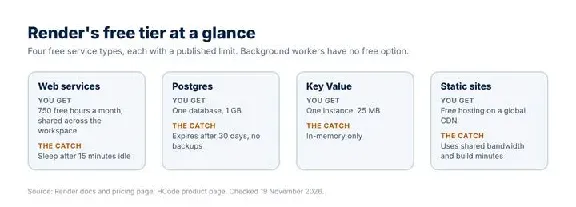
Render offers free versions of four service types. Here are the Render free tier limits as Render publishes them, with the catch that comes with each.
| What's free | What you get | The catch |
|---|---|---|
| Web services | 750 free instance hours per workspace each calendar month, shared across free web services | Spin down after 15 minutes without traffic; about a minute to wake; may restart at any time |
| Postgres | One free database per workspace, 1 GB storage | Expires 30 days after creation; no backups; deleted after a 14-day grace period |
| Key Value | One free instance per workspace, 25 MB | In-memory only; nothing is saved if it restarts |
| Static sites | Free hosting through a global CDN | No spin-down, but they count against your workspace's bandwidth and build minutes |
| Hobby workspace (shared by all services) | 5 GB outbound bandwidth and 500 build pipeline minutes a month | Going over can mean extra charges, suspended services, or paused builds |
| Background workers | No free option | Paid plans only |
Free web services can't receive private network traffic and can only roll back to the two most recent previous deploys. They also can't send email over SMTP ports 25, 465, or 587; a contact form using an SMTP provider on port 587 won't work. Custom domains, managed TLS, and service previews still work.
Render is upfront about all this. Its own docs say of free instances: "Do not use them for production applications."
The limits aren't hidden. The question is what they mean for the people using your app.
Free Web Services: The 15-Minute Rule
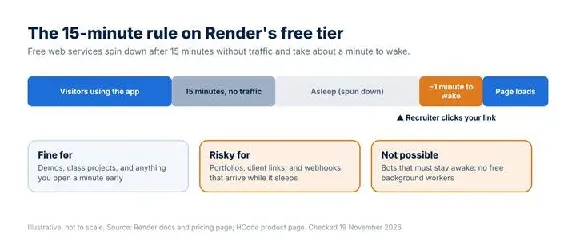
Render's free-tier web services spin down after 15 minutes without any incoming traffic. In plain words, the app goes to sleep. When the next visitor arrives, Render wakes it up, which takes about a minute.
Each workspace gets 750 free instance hours per calendar month, shared across its free web services. One service running all month fits; two use the hours twice as fast. Sleeping services use no hours, and unused hours don't roll over. If the allowance runs out, Render suspends all free web services in the workspace until next month.
A service sleeps after 15 idle minutes, and the whole workspace can be suspended when its hours run out. The 5 GB of bandwidth and 500 build minutes are shared too. Going over can mean extra charges, or suspended services and paused builds for the rest of the month, depending on your spend limit and payment method.
Here's what that means in practice:
- Demos and class projects: Usually fine. You can open the link a minute early.
- Portfolios and job applications: The first visitor of the day waits. For a recruiter or client, that wait is your first impression.
- Webhooks: A payment or form webhook that arrives while the app is waking may time out, depending on the sender's settings.
- Bots: A bot needs to stay running to hear messages. Free web services sleep, and there's no free background worker.
Why a Sleeping App Is Slow to Wake
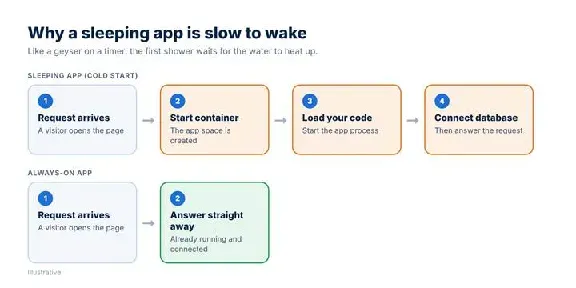
When a sleeping app gets a request, the platform has to start a container (a small, isolated space for your app), load your code, and connect to the database before it can answer. That startup delay is called a cold start.
Think of a geyser on a timer. If it switched off overnight, your first shower of the morning is cold while it heats up. An always-on app is a geyser that stays on: the hot water is ready when you are.
One more thing to know: free web services have an ephemeral filesystem. Any changes your app makes to its own disk, such as uploaded images or a local SQLite database, are lost when the service redeploys, restarts, or spins down. Use a database or external file storage for anything that must last.
The Free Postgres Database Expires After 30 Days
On the Render Postgres free tier, you get one database per workspace, with 1 GB of storage. It's handy for learning, but it comes with a clock.
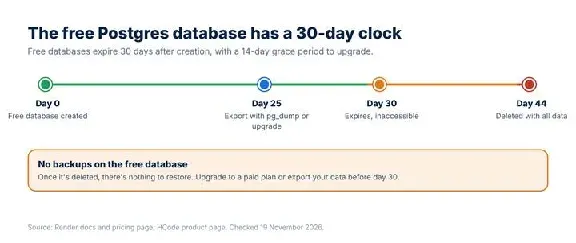
- Day 30: The free database expires 30 days after you create it. It becomes inaccessible unless you upgrade it to a paid plan.
- Grace period: You then have 14 days to upgrade.
- Day 44: If you don't upgrade, Render deletes the database and all its data.
Free databases also have no backups, no connection pooling, and may have maintenance or restarts at any time.
Render emails you before the expiry date and the end of the grace period, but note the date yourself too. That's the line between a practice project and a real one.
Who the Render Free Tier Is Good For
To be fair, the free tier does exactly what it promises. It's a good fit for:
- Learning a new framework or language.
- Class projects and hackathons.
- Short demos where you control when people visit.
A static portfolio with no backend is a particularly good fit: free static sites are served from a global CDN and don't spin down. HCode doesn't have a free tier. The closest thing is a free first month with the code HCODEFREE2026.
What It Costs to Leave the Free Tier
Once you need an app that's always on, with a database that doesn't expire, you move each service to a paid plan. Upgrading your workspace plan alone doesn't remove the free instance limits; each service has to move to a paid instance.
| Render paid service | Monthly price | In rand |
|---|---|---|
| Starter web service (512 MB, 0.5 CPU, always on) | $7 | About R137 |
| Postgres Basic-256mb | $6 | About R117 |
| Postgres Basic-1gb | $19 | About R371 |
| Starter web service + Basic-256mb | $13 | About R254 |
Render prices are in US dollars. Rand estimates use an illustrative rate of R17 to the dollar and include an assumed 15% VAT. Actual costs vary with exchange rates, taxes, extra usage, and billing arrangements.
That's the basic Render free-tier pricing step: about $13 a month for the smallest always-on app with a database, before extra usage. Background workers and cron jobs have no free option; they add paid services on top.
Render Free Tier vs HCode
Here's how the free tier compares with HCode's entry plan. It's a starting-price comparison, not a performance benchmark.
| What you need | Render free tier | HCode Solo |
|---|---|---|
| Always on | No, spins down after 15 minutes idle | Yes |
| Database | One free Postgres database, 1 GB | Managed database included: PostgreSQL or Redis |
| Backups | None on the free database | Daily, kept for 3 days |
| Expiry | Database expires 30 days after creation | No automatic expiry date |
| Price | $0 | From R50 a month |
| Billing currency | US dollars once you upgrade | Rand |
| Where it runs | Web services and databases in Oregon, Ohio, Virginia, Frankfurt, or Singapore; static sites on a global CDN | South Africa |
| Preview deploys | Yes | Not yet |
HCode Solo includes 1 GB of RAM and 3 projects, with Developer at R200 a month and Pro at R499. A failed release never replaces your running app; a bad deploy doesn't take your site down.
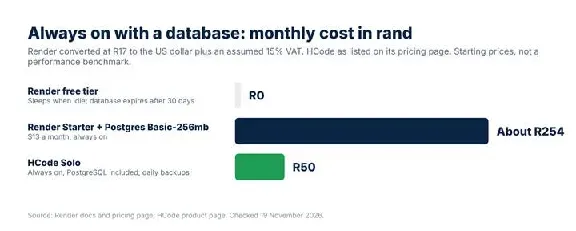
If your app needs to be awake when someone visits, HCode gives you that from R50 a month.
Moving a Render App to HCode
Moving is usually straightforward, because both platforms deploy from Git.
- Connect the same GitHub repository. HCode detects Node.js, Python, Go, Ruby, and PHP apps, or builds your own Dockerfile. Our Python hosting and Express hosting pages cover the common setups.
- Set the same environment variables. Copy them from Render, including your database connection string.
- Move the database. Export your Render database with
pg_dump, then import the file into HCode. HCode backs up the target database before an import replaces it. - Test before switching. Check database connections, logins, forms, scheduled tasks, and integrations.
- Point your domain. Once everything works, update your DNS to the new app.
Coming from Heroku instead? Our guide on how to migrate from Heroku covers that move.
Our Recommendation
Stay on Render's free tier if you're learning, building a class project, or running a demo you control.
Move to HCode if you need:
An always-on app
no spin-downs before a recruiter, client, or customer arrives.
A database that lasts
managed PostgreSQL with daily backups and no automatic expiry date.
Local hosting and rand pricing
your app and data in South Africa, from R50 a month.
Use the free tier to learn. When the project starts to matter, give it a home that stays awake.
FAQs: Render Free Tier vs HCode
Does Render Have a Free Tier?
Yes. Render offers free web services, one free Postgres database, one free Key Value instance, and free static sites. Each has usage limits, and Render doesn't recommend them for production.
How Long Does Render's Free Tier Last?
Free web services have no fixed expiry date, but they share 750 instance hours a month per workspace, which reset each month. Free Postgres databases expire 30 days after creation.
Why Is My Render App Slow to Load?
Free web services spin down after 15 minutes without traffic. The next visit wakes the app, which takes about a minute.
What Happens When Render's Free Postgres Expires?
It becomes inaccessible unless you upgrade. You then have a 14-day grace period, after which Render deletes it and its data. Free databases have no backups.
Can I Use Render's Free Tier for Production?
Render advises against it. Free instances can spin down, restart at any time, and lose local files.
Does Render's Free Tier Support SMTP Email?
No. Free web services can't send traffic on SMTP ports 25, 465, or 587. You'll need a paid instance or an email service that doesn't use those ports.
Can I Host a Static Website on Render for Free?
Yes. Free static sites are served from a global CDN and don't spin down, but they count toward your workspace's bandwidth and build minutes.
Is There an Always-On Alternative Billed in Rand?
Yes. HCode runs always-on apps with managed PostgreSQL from R50 a month, billed in rand and hosted in South Africa.